A Record Lookup
Type a domain or host name to see its IPv4 and IPv6 addresses, with the alias chain and TTLs.
Recent
Your last 10 settings, saved only in this browser. Nothing is uploaded.
Get notified about new checks and updates
We send a short email only when we add a new tool or make a major change to one — no newsletter, no ads, never shared. To unsubscribe, email support@360jiance.com with the word “unsubscribe” and we delete your address. What we store.
How to use the A record lookup
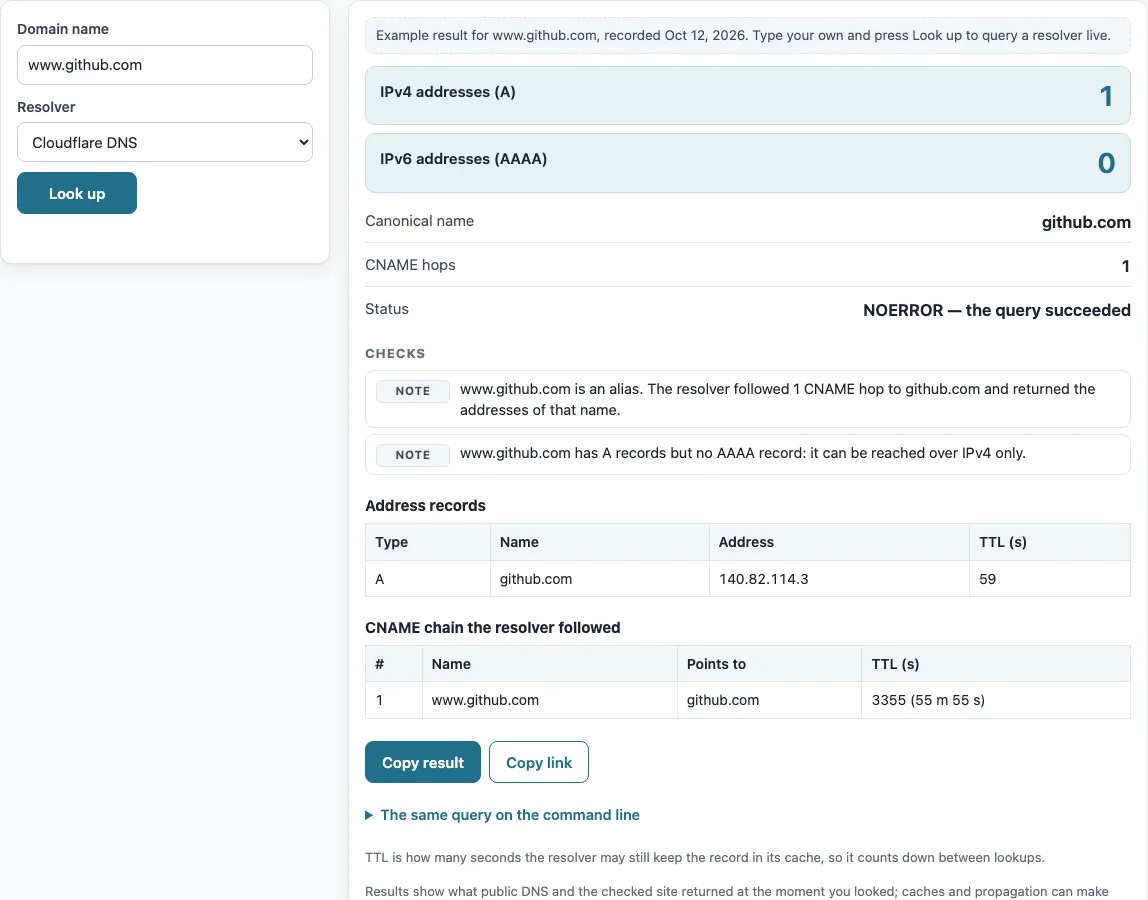
- Type the domain name into the “Domain name” box. The placeholder shows www.example.com. A worked example for www.github.com is shown before your first lookup.
- Choose a “Resolver”: Cloudflare DNS or Google Public DNS.
- Press “Look up”.
- Read the counts “IPv4 addresses (A)” and “IPv6 addresses (AAAA)”.
- Check the “Address records” table. Each row has a Type, a Name, an Address and a TTL (s). A rows are listed first, then AAAA rows, each sorted by address.
- If the name is an alias, look at “Canonical name”, “CNAME hops” and the table “CNAME chain the resolver followed”.
- Read the “Status” line and any warning before you act on the result.
Press “Copy result” to copy the full output as text, or “Copy link” to copy a link to your lookup. Results describe what the resolver returned at the moment you ran the check.
Below the result, “The same query on the command line” lists the matching dig and nslookup commands, so you can repeat the check from a server or compare it with your own network’s resolver. To compare resolvers, run the lookup once with “Cloudflare DNS” and once with “Google Public DNS”: different answers usually mean one of them still holds an older cached copy.
How to check an A record
An A record maps a host name to one IPv4 address. IPv4 addresses are 32-bit numbers written in dotted decimal as four numbers from 0 to 255, such as 104.20.23.154. A name can have several A records, and resolvers may change their order between queries. An AAAA record does the same job for IPv6, which uses 128-bit addresses. The tool sends two queries, one for A and one for AAAA, and shows both sets together.
For example, example.com returns two IPv4 addresses and two IPv6 addresses, with no alias involved.
How to check the A record of a domain
To check a domain, enter it and press “Look up”. The rows in “Address records” with the type A are the domain’s IPv4 addresses. If the name has a CNAME record, it has no A or AAAA record of its own. The resolver follows the chain of CNAME names, and the addresses come from the last name in the chain (RFC 1034 §3.6.2). The tool lists each hop in “CNAME chain the resolver followed”. For www.microsoft.com, the chain has two hops before the address records appear.
The tool also reports some common findings. A name that exists but has no A or AAAA record is flagged. A name with A records but no AAAA record is noted as reachable over IPv4 only, and the reverse case is flagged too. A CNAME loop is reported as an error. Addresses in private, loopback or link-local ranges get a warning. These include 10.0.0.0/8, 172.16.0.0/12 and 192.168.0.0/16 (RFC 1918 §3), and 127.0.0.0/8 (RFC 1122 §3.2.1.3). The TTL value shows how many seconds the record has left in the resolver’s cache, not the full lifetime set by the owner.
Sources (checked 13 October 2026): RFC 1034 · RFC 1122 · RFC 1918 · Cloudflare DNS docs · Google Public DNS docs
Worked examples
| Input | Result |
|---|---|
| www.github.com | 1 IPv4, 0 IPv6 |
| example.com | 2 IPv4, 2 IPv6 |
| github.com | 1 IPv4, 0 IPv6 |
| www.microsoft.com | 1 IPv4, 5 IPv6 |
Calculated by the tool above; open it with the same values to see each step.
Frequently asked questions
How do I get the IP address of a DNS name?
Enter the name and press “Look up”. The “Address” column in “Address records” shows the IP address the name resolves to. If the name is an alias, that column shows the address of the canonical name.
Can I do a reverse A record lookup by IP?
No. The tool refuses IP addresses and points you to the reverse DNS tool. A record maps a name to an IP address, so finding a name from an IP address needs a PTR record under in-addr.arpa instead.
Can I run a bulk A record lookup?
Not on this page. The tool checks one name at a time. Bulk lookups are on the waitlist for the Pro and API plans.
Can I check A records from the command line?
Yes. On most systems you can run dig +noall +answer example.com A or nslookup -type=A example.com. Use AAAA in place of A to check IPv6 addresses.
Why does my result show a CNAME chain?
The name you entered is an alias that points to another name. The resolver follows each CNAME and returns the addresses of the final name. The “CNAME hops” count tells you how many links it followed.
What does the TTL value mean?
TTL is the number of seconds a record may be kept in a cache. The TTL shown is what remains in the resolver’s cache at the time of your lookup, so it can be lower than the value the record was published with.
Related tools
- DNS lookup: Use it to look up other record types for a name, all in one place.
- CNAME lookup: Use it when you only need to see whether a name is an alias and where it points.
- Reverse DNS lookup: Use it to find the name behind an IP address.
- MX lookup: Use it to check the mail servers for a domain.
- TXT record lookup: Use it to read the text records published for a name.
- NS lookup: Use it to see which name servers are authoritative for a domain.
- DNS propagation checker: Use it to see whether a record change has reached several resolvers.
- DNS record types: Use it to learn what each record type is for.