CAA Record Lookup
Type a domain to see its CAA records and which certificate authorities may issue for it.
Recent
Your last 10 settings, saved only in this browser. Nothing is uploaded.
Get notified about new checks and updates
We send a short email only when we add a new tool or make a major change to one — no newsletter, no ads, never shared. To unsubscribe, email support@360jiance.com with the word “unsubscribe” and we delete your address. What we store.
This CAA record lookup finds the CAA records that apply to a domain name and shows which certificate authorities (CAs) may issue regular and wildcard certificates for it. Use it as a CAA record checker when you want to see what a domain’s DNS allows before a certificate is requested.
Enter a domain name, pick a resolver, and press Look up. The tool follows the same climb to parent names that certificate authorities perform, so it shows the record that actually applies, even when the name itself has none. No sign-up is needed. A live lookup sends only the domain name to the resolver you choose. The result describes what the check saw at that moment. This page reads CAA records only and does not write them.
How to use the CAA record lookup
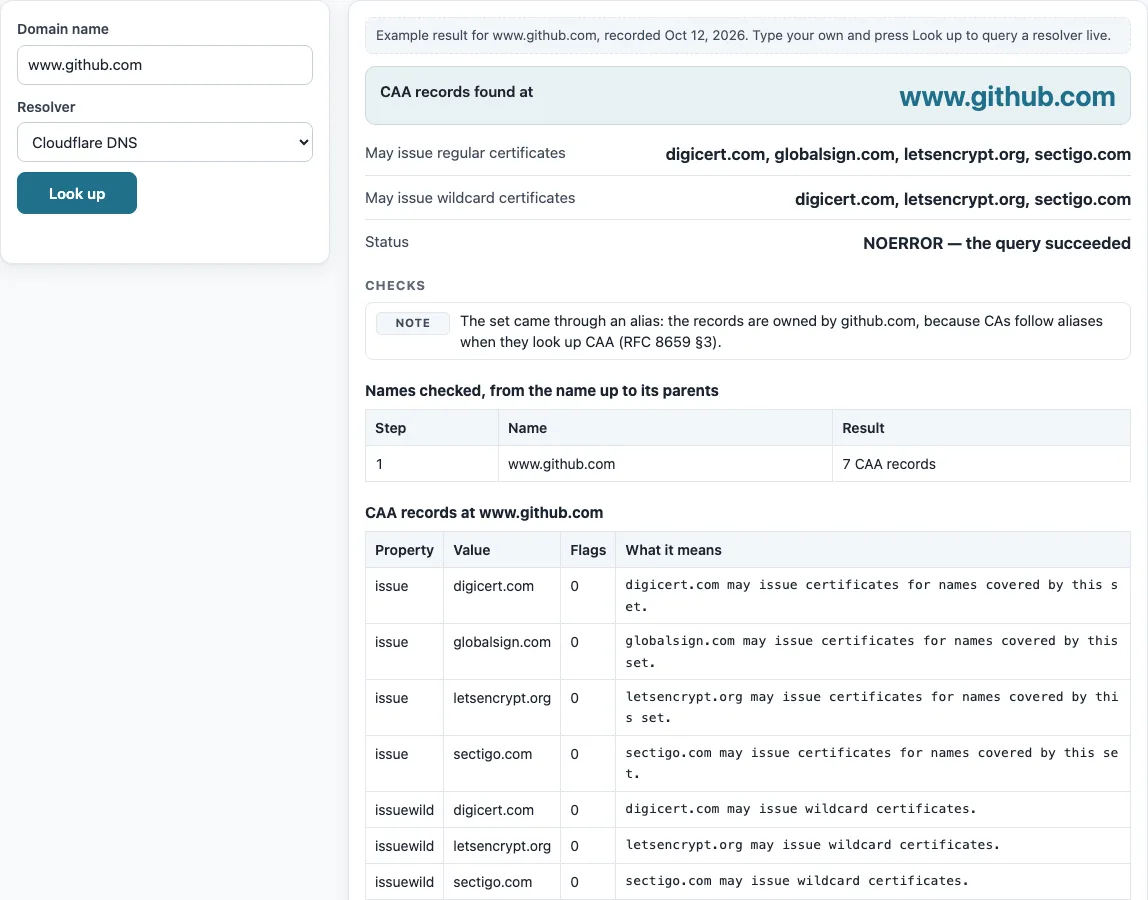
- Type the domain into the “Domain name” box. The placeholder shows www.example.com as an example.
- Pick a “Resolver” from the list.
- Press “Look up”.
- Read “CAA records found at” to see which name the records came from.
- Read “May issue regular certificates” and “May issue wildcard certificates” to see which CAs are allowed for each type.
- Check “Status” and the checks list for warnings or notes.
- Open the table “Names checked, from the name up to its parents” to see each name the tool queried.
- Open the table “CAA records at
” to see each property, its value, its flags, and what it means.
Before your first lookup, the page shows a labelled example for www.github.com so you can see what a full result looks like. Use “Copy result” to copy the output as text, or “Copy link” to copy a link to your lookup.
Below the result, “The same query on the command line” lists the matching dig and nslookup commands, so you can repeat the check from a server or compare it with your own network’s resolver. To compare resolvers, run the lookup once with “Cloudflare DNS” and once with “Google Public DNS”: different answers usually mean one of them still holds an older cached copy.
How to check CAA record
To check a CAA record, enter the domain in the “Domain name” box and press “Look up”. The result lists the CAA records that apply to the name, or to its nearest parent that has them, and states whether regular and wildcard certificates may be issued.
What a CAA record tells a certificate authority
A CAA record is a DNS record that lists which certificate authorities may issue certificates for a name. A certificate authority must not issue unless the request is consistent with that set (RFC 8659 §3). If nothing restricts issuance, the result reads “Any certificate authority”. If issuance is switched off, it reads “No certificate authority”.
How the lookup climbs to parent names
The tool asks for the CAA records of the name first. If there are none, it asks the parent, then the parent of that, and so on, stopping at the first name that has CAA records. It stops below the top-level label and never queries the root. It checks up to 10 levels. Aliases are followed, so a name reached through a CNAME can use the records of its target (RFC 8659 §3). For example, if A.B.C has no records and B.C has “issue example.com”, the search stops at B.C.
What issue, issuewild and iodef mean
The issue property authorises a named CA for a name. An empty value or “;” means no CA may issue (RFC 8659 §4.2). The issuewild property applies only to wildcard names and takes precedence over issue for them. If at least one issuewild exists, issue is ignored for wildcard requests (RFC 8659 §4.3). The iodef property gives a URL, either mailto: or https:, where CAs may report violations (RFC 8659 §4.4). Any parameters after “;” appear in the Value column but are not interpreted.
What the critical flag does
The Flags column shows the flag number and “(critical)” when bit 0 is set, which has the value 128. This is the Issuer Critical Flag. A CA must not issue if the set contains a critical property it does not understand (RFC 8659 §4.1, §4.5).
What happens when there is no CAA record
If no CAA set is found anywhere on the climb, no CAA restriction applies (RFC 8659 §3). A set that contains only iodef or only unrecognised tags does not restrict issuance either, so the result is shown as an informational check rather than a block.
Sources (checked 13 October 2026): RFC 8659
Worked examples
| Input | Result |
|---|---|
| github.com | found at github.com; CAs: digicert.com, globalsign.com, letsencrypt.org, sectigo.com |
| google.com | found at google.com; CAs: pki.goog |
| www.github.com | found at www.github.com; CAs: digicert.com, globalsign.com, letsencrypt.org, sectigo.com |
| example.com | no CAA records: any CA may issue |
Calculated by the tool above; open it with the same values to see each step.
Frequently asked questions
Does this tool create a CAA record?
No. The page only reads records. The formats for writing one are 0 issue "ca.example.net", 0 issuewild "ca.example.net", and 0 iodef "mailto:security@example.com" (RFC 8659 §4). You add them in your own DNS settings.
How do I check a CAA record from the command line?
Run dig +noall +answer example.com CAA or nslookup -type=CAA example.com, replacing the domain with your own. These show the same records the lookup reads, though the tool also walks up to parent names for you.
Does checking a CAA record change existing certificates?
No. CAA is checked by CAs at the time they issue a certificate. Certificates that already exist are not affected by what the lookup shows.
Does the tool show which company runs each certificate authority?
No. It lists the CA domain names as they are published in the record. It does not map them to company names. Some CAs also accept account-binding parameters, which the tool displays but does not evaluate.
What data does a lookup send?
A live lookup sends only the domain name to the resolver you selected. Nothing else is sent.
Do I need a CAA record?
No. Without one, any certificate authority may issue for the domain. Adding one limits issuance to the CAs you list.
Related tools
- DNS lookup - use it to look up several record types for a domain at once.
- A record lookup - use it to see which IP addresses a name points to.
- MX lookup - use it to check which mail servers accept mail for a domain.
- TXT record lookup - use it to read the text records a domain publishes.
- CNAME lookup - use it to find the alias target a name points to, since CAA lookups follow aliases.
- NS lookup - use it to see which name servers are authoritative for a domain.
- Reverse DNS lookup - use it to find the name attached to an IP address.
- DNS propagation checker - use it to see whether a DNS change has reached different resolvers.