CNAME Lookup
Type a host name to follow its CNAME (alias) chain to the final name and IP addresses.
Recent
Your last 10 settings, saved only in this browser. Nothing is uploaded.
Get notified about new checks and updates
We send a short email only when we add a new tool or make a major change to one — no newsletter, no ads, never shared. To unsubscribe, email support@360jiance.com with the word “unsubscribe” and we delete your address. What we store.
This CNAME lookup checks whether a domain name is an alias for another name. It reads the CNAME record for the name you enter, follows the whole chain to the final name, and shows the addresses found there. It also tells you whether a CNAME is allowed where the name sits, such as on a zone apex.
Enter a domain name and pick a resolver to run a live lookup. The lookup sends only the domain name to the resolver you choose. The tool is free and needs no sign-up.
Results describe what the resolver returned at that moment. Resolvers keep answers in their cache until the TTL runs out, so a recent change may take time to appear.
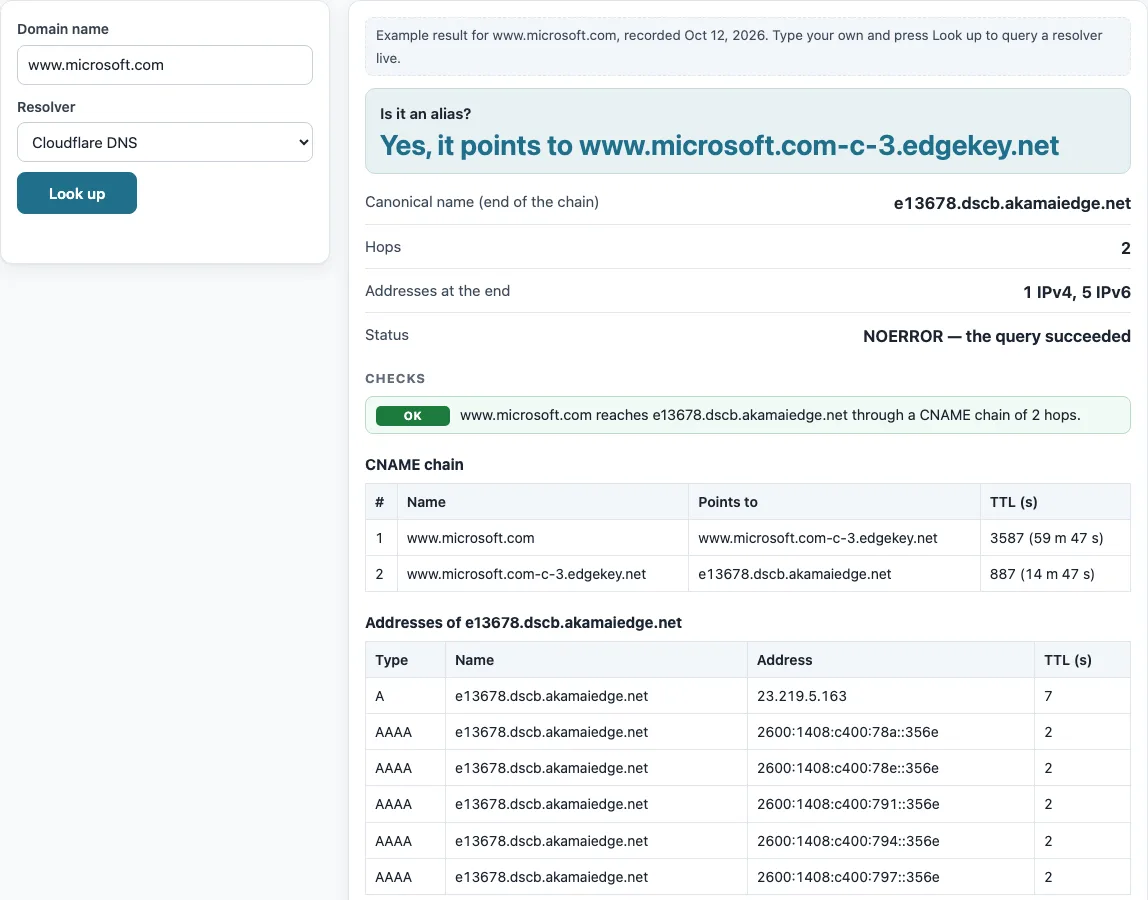
How to use the CNAME lookup
- Type a name into “Domain name”. The placeholder is www.example.com. You can enter a host name such as www.example.com, or a bare domain to test whether it is a zone apex.
- Pick a “Resolver” from the list.
- Press “Look up”.
- Read the summary. “Is it an alias?” shows either “Yes, it points to
” or “No CNAME record”. Then check “Canonical name (end of the chain)”, “Hops”, “Addresses at the end” and “Status”. - Open the “CNAME chain” table. Each row shows #, Name, Points to and TTL (s).
- Open the “Addresses of
” table, then read the checks shown with the result.
Before your first lookup, the tool shows a labelled example for www.microsoft.com, so you can see what a result looks like. Use “Copy result” to copy the output, or “Copy link” to copy a link to your lookup.
Below the result, “The same query on the command line” lists the matching dig and nslookup commands, so you can repeat the check from a server or compare it with your own network’s resolver. To compare resolvers, run the lookup once with “Cloudflare DNS” and once with “Google Public DNS”: different answers usually mean one of them still holds an older cached copy.
CNAME meaning: what does a CNAME record do in DNS?
A CNAME record, short for canonical name record, makes one name an alias of another. The owner name is the alias, and the record’s data is the real name, called the canonical name. For example, www.github.com points to github.com, so github.com is the canonical name for www.github.com.
When a resolver finds a CNAME, it restarts the query at the canonical name (RFC 1034 §3.6.2 and §4.3.2). A chain can have several hops, with one alias pointing to another alias before the final name. The tool reads the A answer, which contains every hop, so one lookup shows the whole chain. A CNAME-type query returns only the first hop.
A CNAME search like this is the quickest way to see a CNAME entry in DNS as resolvers see it, rather than as your DNS panel shows it. The tool flags several problems in a chain. A CNAME loop is a problem because names point back to each other and never reach an address. A dangling target is a problem when the final name does not exist (NXDOMAIN). A final name with no A or AAAA records gets a warning. A dangling CNAME can also be a risk: if its target is a service name that someone else could claim, the alias could be taken over.
What is CNAME for, and where can it not go?
A CNAME is the standard way to make one name an alias of another. Its owner name cannot hold any other data. If a CNAME record exists at a node, no other data should be there (RFC 1034 §3.6.2). Only DNSSEC records may sit alongside it (RFC 2181 §10.1). MX and NS targets must also not be aliases.
A zone apex, the bare domain such as example.com, always holds SOA and NS records. Because of this, a CNAME is not allowed there. The tool runs an apex test: it asks for the made-up name _zone-probe.<name> and reads the SOA record in the authority section of the negative answer (RFC 2308 §3 and §5). If the zone name in that SOA equals the name you typed, the name is a zone apex. If a wildcard answers the probe, the test is skipped.
For example, github.com returns “No CNAME record”, and its zone probe returns an SOA owned by github.com. The tool therefore notes that a CNAME is not allowed at that name. Results show what the resolver returned. A misconfigured authoritative server may answer differently to other resolvers.
Sources (checked 13 October 2026): RFC 1034 · RFC 2181 · RFC 2308
Worked examples
| Input | Result |
|---|---|
| www.microsoft.com | alias of e13678.dscb.akamaiedge.net (2 hops) |
| www.github.com | alias of github.com (1 hop) |
| github.com | no CNAME record |
| example.com | no CNAME record |
Calculated by the tool above; open it with the same values to see each step.
Frequently asked questions
What is a CNAME record in DNS?
A CNAME is a DNS record that makes one name an alias of another name. The alias passes its queries on to the canonical name, which holds the real data. CNAME stands for canonical name record.
How do I check a CNAME record with nslookup?
Open a terminal and run nslookup -type=CNAME www.example.com. The output shows the name the alias points to. You can also use this tool by entering the name and pressing “Look up”.
How do I verify a CNAME record after a change?
Look up the name and compare “Points to” with the target your provider asked for. Trailing dots are ignored in the comparison. Allow the TTL to pass after a change, because resolvers may keep the old answer until it expires.
Can a CNAME be on the zone apex?
No. The zone apex always holds SOA and NS records, and a CNAME cannot sit alongside other data at the same name (RFC 1034 §3.6.2). Some DNS providers offer ALIAS, ANAME or flattening features for this case, because they answer with address records instead.
What is a dangling CNAME?
A dangling CNAME points to a name that no longer exists, so the answer is NXDOMAIN. The tool reports this as a problem. If the target is a service name that someone else could claim, the alias can be taken over, so remove or update it.
Is an ALIAS record the same as a CNAME?
No. A CNAME is the standard alias record. ALIAS, ANAME and flattening are provider features that answer with address records instead, which is why a provider can offer them on a zone apex.
Related tools
- DNS lookup to query any DNS record type for a domain in one step.
- A record lookup to check the IPv4 addresses a name resolves to, including the end of a CNAME chain.
- MX lookup to see the mail servers for a domain, which must not be aliases.
- TXT record lookup to read TXT records for a domain or subdomain.
- NS lookup to see which name servers are listed for a zone.
- Reverse DNS lookup to find the name attached to an IP address.
- DNS propagation checker to see whether a record change has reached several resolvers.
- DNS record types to compare CNAME with other record types.