Cookie Checker
Enter a web address, or paste Set-Cookie lines, to check every cookie's security attributes.
How this check works: our server sends one ordinary GET request per redirect step (at most 10) to the public address you enter, the same request a browser would make, and shows you a short summary — status codes, selected response headers and, for robots.txt, the file itself (up to 64 KB). It never sends data on your behalf, never contacts private or internal addresses, and does not log or store what you type; results are cached for 10 minutes and each visitor can run 10 checks per minute.
Recent
Your last 10 settings, saved only in this browser. Nothing is uploaded.
Get notified about new checks and updates
We send a short email only when we add a new tool or make a major change to one — no newsletter, no ads, never shared. To unsubscribe, email support@360jiance.com with the word “unsubscribe” and we delete your address. What we store.
This cookie checker lists the cookies a website sets and flags security problems on each one. Enter a web address and press “Check cookies” to see each cookie’s name and its Secure, HttpOnly and SameSite settings. You can also paste Set-Cookie lines to check cookies you already have, including their Domain, Path, Expires and Max-Age.
This free cookie checker website needs no sign-up. Pasted lines are parsed in your browser. A web address is sent only to this site’s read-only check service, which fetches that one address. Results describe what the check saw at that moment, not how the site will behave later.
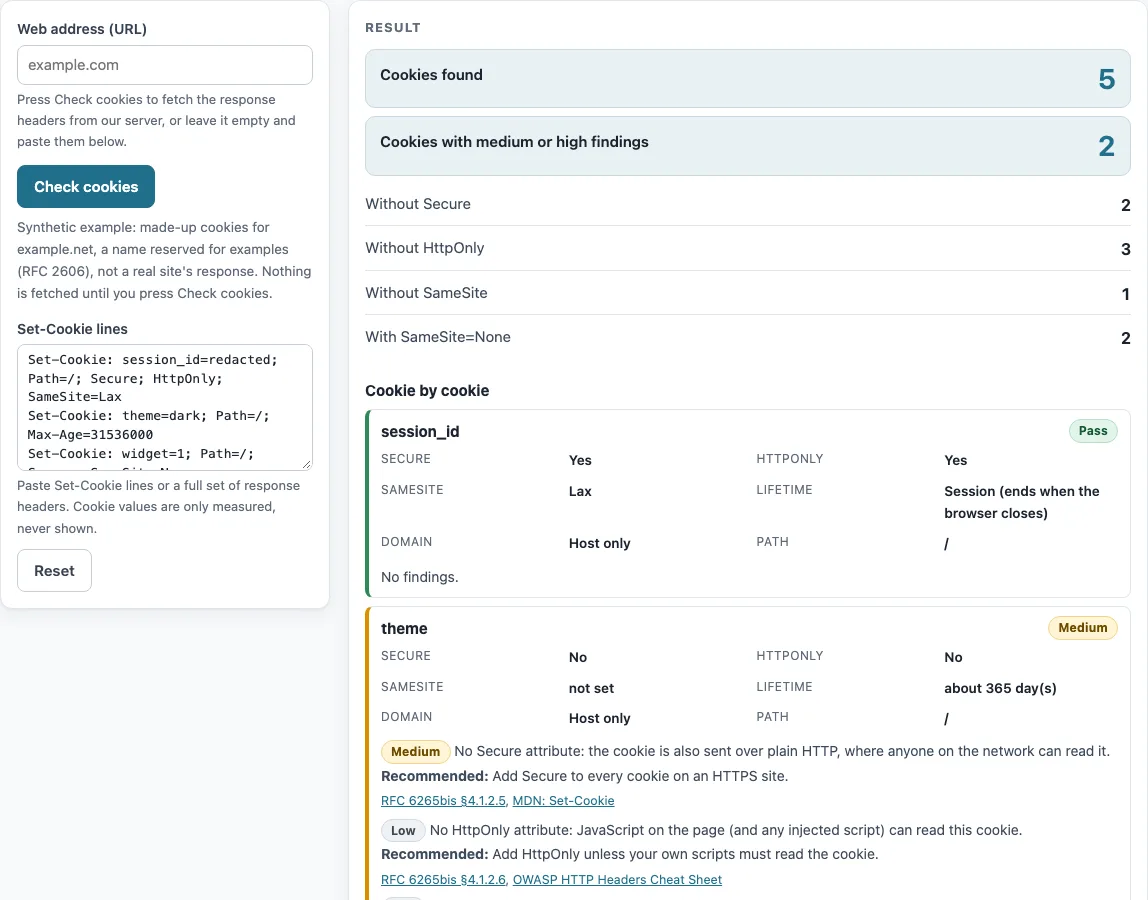
How to use the cookie checker
- Type the full address of the page into “Web address (URL)”, including https://.
- Press “Check cookies”. The check reports the Set-Cookie names and their Secure, HttpOnly and SameSite settings. Values, Path, Domain and lifetime are not reported from an address, so use step 5 for those details.
- Read “Cookies found” first. Then check the counts for “Without Secure”, “Without HttpOnly”, “Without SameSite”, “With SameSite=None” and “Cookies with medium or high findings” to see where the problems are.
- Scroll to “Cookie by cookie”. Each card shows the name, a badge, the flags, Lifetime, Domain and Path, followed by its findings. Each finding has a severity, a description, “Recommended:” and “Source:”.
- For a complete check, paste full Set-Cookie lines into “Set-Cookie lines”. Include Domain, Path, Expires and Max-Age, because these are parsed locally and used in the cards.
The page opens with a worked example of made-up cookies for example.net, labelled as synthetic, so you can read the output before you enter anything. The check reports up to 20 cookies. If a site sets more, the page notes it.
The cookie checker (some people search for it as one word, cookiechecker) reads only the cookies of the address you enter. Check the pages where cookies are set, such as the sign-in page, as well as the home page.
How can I check what cookies a website sets?
A website sets a cookie with a Set-Cookie line in its HTTP response, and the browser stores it with attributes that decide where it can be sent. Reading those lines shows each cookie’s name and flags without revealing its value, which this tool never displays.
Three attributes matter most for security. Secure limits a cookie to secure channels (RFC 6265bis §4.1.2.5). HttpOnly keeps the cookie away from non-HTTP APIs such as document.cookie (§4.1.2.6). This matters because without HttpOnly, any script on the page can read the cookie, so an injected script could steal it. SameSite controls cross-site sending: Strict allows same-site requests only, Lax also allows cross-site top-level navigations, and None allows all requests (§4.1.2.7). Lax navigations apply only to safe methods such as GET (§5.6.7.1).
Scope and lifetime work differently. Domain makes a cookie available to that domain and its subdomains. Without Domain, the cookie is host-only (§4.1.2.3). Max-Age takes precedence over Expires (§4.1.2.2). A lifetime should not exceed 400 days, or 34 560 000 seconds (§5.5).
Why does my cookie not show up in the browser?
Browsers drop a Set-Cookie line when it breaks a rule, so the cookie never reaches storage and the page shows no error. The most common cause is SameSite=None without Secure. The browser ignores that cookie (RFC 6265bis §5.7 step 19; MDN Set-Cookie).
Other causes are name rules and size limits. A name starting with __Secure- needs Secure, and a name starting with __Host- needs Secure, Path=/ and no Domain (§4.1.3). Prefixes are matched case-insensitively (§5.4), so __host- is still checked. A name plus value over 4096 octets is ignored (§5.6 step 5), and attribute values over 1024 octets are ignored. A Set-Cookie string without “=” has an empty name (§5.7). A zero or negative Max-Age deletes the cookie (MDN), so a cookie you expected to keep may be removed at once.
The findings on each card name the rule that was broken and give a recommendation. Use them to find the line to fix.
Sources (checked 13 October 2026): IETF Datatracker
Worked examples
| Input | Result |
|---|---|
| 1 cookie line(s) | 0 with medium or high findings; 0 without Secure |
| 1 cookie line(s) | 1 with medium or high findings; 1 without Secure |
| 1 cookie line(s) | 1 with medium or high findings; 0 without Secure |
| 2 cookie line(s) | 0 with medium or high findings; 0 without Secure |
| 5 cookie line(s) | 2 with medium or high findings; 2 without Secure |
Calculated by the tool above; open it with the same values to see each step.
Frequently asked questions
Can this tool see cookies set by JavaScript?
No. The check only sees cookies sent in the HTTP response of the one address you enter. Cookies set by JavaScript or by other pages are not visible.
Does the tool store or show my cookie values?
No. Values are only measured against the 4096-byte limit and are never shown. Pasted Set-Cookie lines stay in your browser.
Which cookie flags should a session cookie have?
Use Secure, HttpOnly and SameSite=Lax, or SameSite=Strict if the cookie never needs to cross sites. The tool flags a missing Secure as medium, and a missing HttpOnly or SameSite as low.
Is the cookie checker free to use?
Yes. It is free and needs no sign-up.
Why does the page say more cookies were set?
The check reports up to 20 cookies. If a site sets more than that, the page notes how many were set so you know the list is incomplete.
What does “Without SameSite” mean on the results?
It counts cookies whose Set-Cookie line has no SameSite attribute. The card lists this as a low finding with a recommendation.
Which pages should I check?
Check the pages that set cookies: the home page, the sign-in page and any page with a consent banner. Cookies set on a later page after sign-in only appear when you paste their Set-Cookie lines.
Related tools
- Security headers checker: use it to check the other response headers a site sends alongside its cookies.
- HSTS checker: use it to check whether a site’s Strict-Transport-Security header is set.
- SameSite cookie builder: use it to write a Set-Cookie line with the SameSite attribute you need.
- CSP evaluator: use it to review a Content-Security-Policy header for script-related weaknesses.
- SSL checker: use it to check a site’s certificate when you also need to confirm its HTTPS setup.