Content Security Policy Generator
Choose a starting policy and add the sources you need to get a CSP header and meta tag.
Recent
Your last 10 settings, saved only in this browser. Nothing is uploaded.
Get notified about new checks and updates
We send a short email only when we add a new tool or make a major change to one — no newsletter, no ads, never shared. To unsubscribe, email support@360jiance.com with the word “unsubscribe” and we delete your address. What we store.
<meta> tag. Everything is computed in your browser, so no sign-up is needed and the policy you build is not sent to a server. You can start from one of three starting points, add the sources your site loads, and see a check of the result before you copy it. Use it as a content security policy builder, creator, or sample source when you need a policy to adapt for your own site.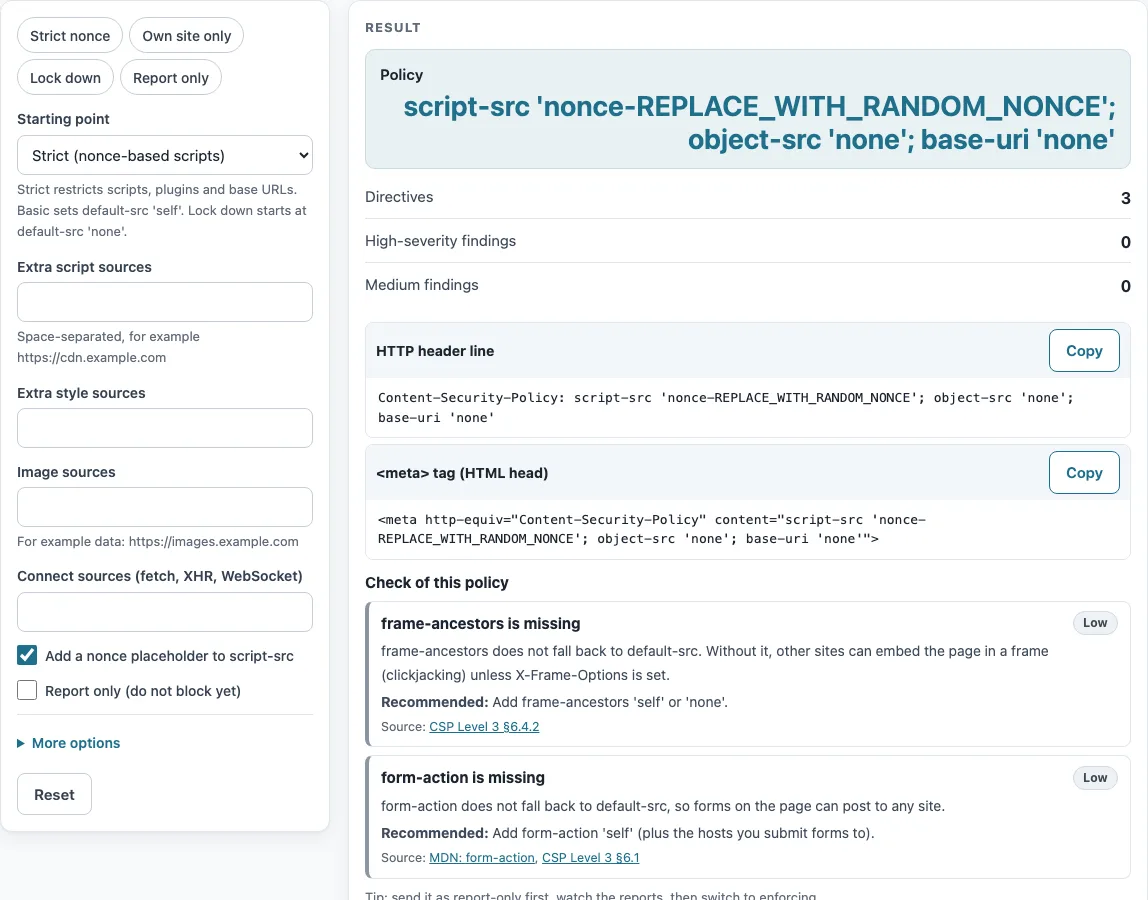
How to use the CSP generator
- Choose a Starting point: “Strict (nonce-based scripts)”, “Basic (everything from your own site)”, or “Lock down (block everything, then allow)”. You can also pick a preset: Strict nonce, Own site only, Lock down, or Report only.
- Add any extra sources in “Extra script sources”, “Extra style sources”, “Image sources”, or “Connect sources (fetch, XHR, WebSocket)”. Separate sources with spaces. Unquoted keywords such as self are quoted for you.
- Leave “Add a nonce placeholder to script-src” on if your server will generate nonces.
- Turn on “Report only (do not block yet)” while you test.
- Open More options to set font, frame, media, form-action, frame-ancestors, or base-uri sources. You can also use “Add ‘strict-dynamic’”, “Script hashes”, “report-uri (URL)”, “report-to (group name)”, or “Upgrade insecure requests”.
- Read Policy, then Directives, High-severity findings, and Medium findings. Fix any high-severity finding before you deploy.
- Use the Copy buttons on the header line or the meta tag. The Check of this policy section lists the same findings as the CSP evaluator.
The four presets are a quick way to compare policies: load one, read its findings, then change the sources. Nothing you type leaves your browser.
Copy the result into a test environment first.
What is content security policy?
A content security policy (CSP) is a browser feature that lets a site declare which sources of content are allowed, mainly to limit cross-site scripting. The browser blocks anything the policy does not allow. Each directive covers one resource type. For example, script-src controls scripts, and img-src controls images. The keyword 'self' means your own site, and 'none' blocks everything for that directive. Per the MDN CSP guide and CSP Level 3, the policy restricts where scripts, styles, images, frames, and other resources may load from.
A Basic policy from this tool looks like this:
default-src 'self'; object-src 'none'; base-uri 'self'; form-action 'self'; frame-ancestors 'self'
object-src 'none' blocks <object> and <embed>, and base-uri 'none' blocks <base>.
What is content security policy header?
The policy is delivered as the Content-Security-Policy HTTP response header. When you choose report-only mode, the header name becomes Content-Security-Policy-Report-Only, and the browser reports violations without blocking them. MDN recommends rolling out a policy this way first. Collect the reports with report-uri or report-to. The report-to option needs a Reporting-Endpoints header on the server.
How do I generate a nonce?
A nonce is a random value that must be unguessable and at least 128 bits long (CSP3 §7.1). Use at least 16 random bytes, encoded in base64, and create a new value for every response. The nonce must appear in the policy and in each script tag’s nonce attribute. This tool only inserts the placeholder REPLACE_WITH_RANDOM_NONCE. Your server must replace it with a fresh value on each request. A static HTML file cannot use nonces, so use hashes instead. Hashes must be sha256-, sha384-, or sha512- values in base64, and you must recalculate them whenever the script changes (MDN). The 'unsafe-inline' keyword is ignored when a nonce or hash is present. 'strict-dynamic' lets a trusted script load more scripts (CSP3 §8.2). The tool warns if you use 'strict-dynamic' without a nonce or hash.
Can I use a meta tag?
Yes. The tag looks like <meta http-equiv="Content-Security-Policy" content="...">. It works for most directives. The report-uri, frame-ancestors, and sandbox directives are ignored in a meta tag (CSP3 §3.3), and report-only mode is not supported there. The tool leaves those three directives out of the tag and shows a warning. It does not generate a meta tag in report-only mode.
Sources (checked 13 October 2026): MDN · W3C
Worked examples
| Input | Result |
|---|---|
| Starting point: Strict (nonce-based scripts) | script-src 'nonce-REPLACE_WITH_RANDOM_NONCE'; object-src 'none'; base-uri 'none' |
| Starting point: Basic (everything from your own site) | default-src 'self'; object-src 'none'; base-uri 'self'; form-action 'self'; frame-ancestors 'self'; script-src https://cdn.example.com; i… |
| Starting point: Lock down (block everything, then allow) | default-src 'none'; script-src 'self'; style-src 'self'; img-src 'self'; connect-src 'self' https://api.example.com; font-src 'self'; bas… |
| Starting point: Strict (nonce-based scripts) | script-src 'nonce-REPLACE_WITH_RANDOM_NONCE' 'strict-dynamic'; object-src 'none'; base-uri 'none'; report-uri https://example.com/csp-rep… |
Calculated by the tool above; open it with the same values to see each step.
Frequently asked questions
How do I add a CSP header?
Copy the header line from the tool and paste it into your server configuration. The tool shows the header line only, so your server must send it with each page response.
Which policy should I start with?
Use Strict with a nonce if you control your scripts. Use Basic otherwise. Test either one as report-only before you enforce it.
What do the three starting points contain?
Strict uses script-src 'nonce-REPLACE_WITH_RANDOM_NONCE'; object-src 'none'; base-uri 'none'. Basic uses default-src 'self' with object-src 'none', base-uri 'self', form-action 'self', and frame-ancestors 'self'. Lock down blocks everything by default and allows only your own site for scripts, styles, images, connections, and fonts.
Does this tool send my policy anywhere?
No. The policy is built and checked in your browser, and the tool makes no API calls.
Can I check the policy after I edit it by hand?
Yes. Paste the edited policy into the CSP evaluator, which runs the same checks as the “Check of this policy” section here and lists each finding with its source.
Will a strict policy break my site?
It can. A strict policy blocks inline scripts and any source you did not list, so deploy it in report-only mode first and read the reports before you enforce it.
Related tools
- CSP evaluator: Use it to check an existing policy for weak or risky directives.
- Security headers checker: Use it to see which security headers a site sends, including CSP.
- X-Frame-Options checker: Use it when you want to check framing rules that overlap with frame-ancestors.
- HSTS checker: Use it to check the Strict-Transport-Security header on your site.
- SSL checker: Use it to check the certificate and HTTPS setup for your domain.