DKIM Checker
Type a domain and selector to look up its DKIM record and check the public key.
Recent
Your last 10 settings, saved only in this browser. Nothing is uploaded.
Get notified about new checks and updates
We send a short email only when we add a new tool or make a major change to one — no newsletter, no ads, never shared. To unsubscribe, email support@360jiance.com with the word “unsubscribe” and we delete your address. What we store.
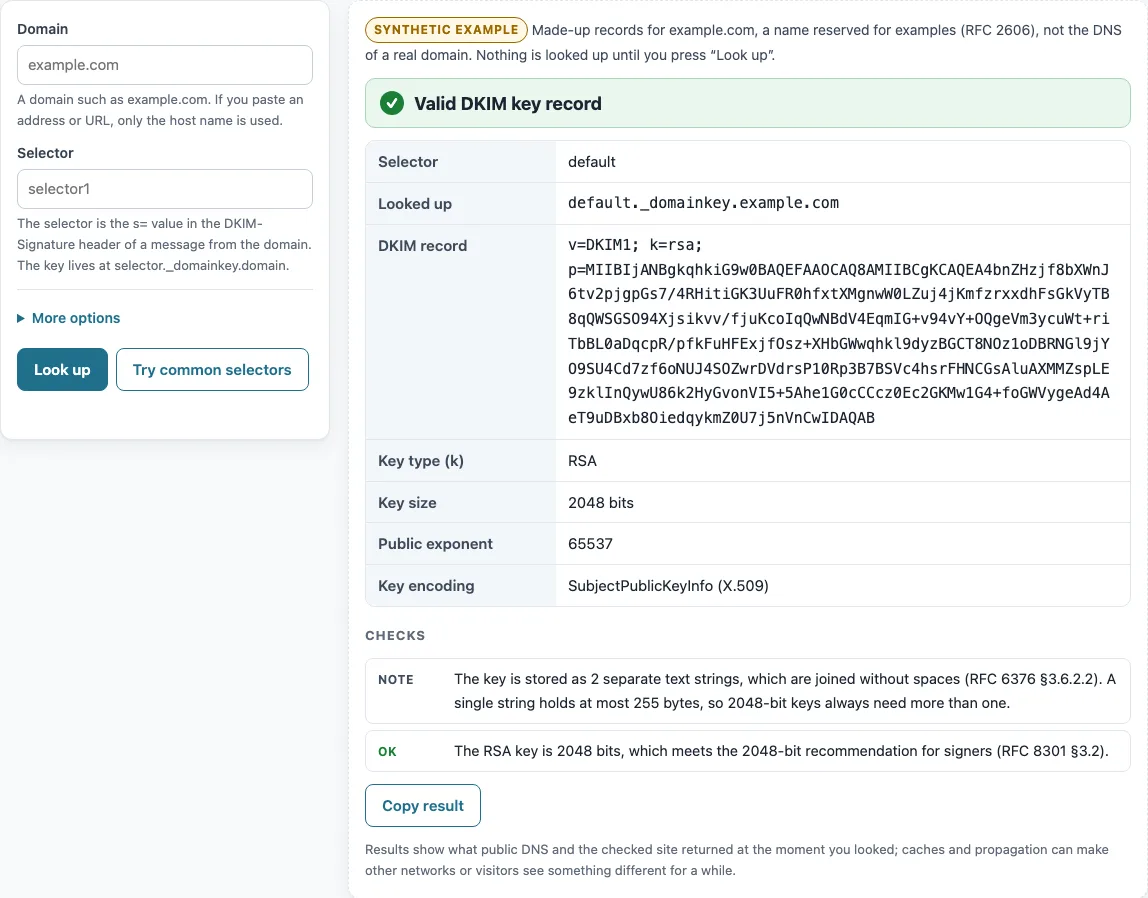
This DKIM checker looks up the DKIM public key that a domain publishes for one selector and shows whether that key is valid. Enter a domain and a selector, press Look up, and the page reads the TXT record at <selector>._domainkey.<domain> over DNS-over-HTTPS. It then decodes the key and reports its type, its size in bits, and any problems it finds.
The decoding runs in your browser. The tool is free and needs no sign-up. The only thing sent out is the domain and selector name, to the DNS resolver you choose. The checker reads the public key in DNS only. It does not verify a signature on an email, and it cannot tell which selector a message used. For SPF, use the separate SPF record checker.
How to use the DKIM checker
- Type your domain in the Domain box, for example
example.com. - Type the selector in the Selector box. If you do not know it, open a message your domain sent and read the
s=value in its DKIM-Signature header. - Press Look up.
- Read the verdict at the top. It is one of Valid DKIM key record, DKIM key record found, with warnings, DKIM key record has errors, DKIM key revoked, or No DKIM record at the name you searched.
- Check the rows DKIM record, Key type (k), Key size, and Status, then go through the Checks list. Each check is marked OK, Note, Warning, or Error.
- If you are not sure of the selector, press Try common selectors. The result lists the names under Selectors with a record.
Open More options and use DNS resolver to switch between Cloudflare DNS (the default) and Google Public DNS. After a lookup, Copy link keeps the result in the address bar, and Copy result copies the output as text.
If a lookup finds a CNAME at the selector name, the result shows where it points and decodes the key at the target, as a receiving server would.
Each key is checked on its own.
How to get DKIM record for a domain
A DKIM public key is a TXT record at <selector>._domainkey.<domain>. To get the record, ask DNS for that exact name (RFC 6376 §3.6.2.1). The selector foo.bar on example.com lives at foo.bar._domainkey.example.com. The selector is the s= tag of the DKIM-Signature header, and the domain is the d= tag (RFC 6376 §3.5).
Domain owners publish the record, usually through their mail provider’s setup page. A 2048-bit key does not fit in one TXT string of 255 octets at most, so it is split into several strings that are joined without spaces (RFC 6376 §3.6.2.2, RFC 1035 §3.3). Keep only one key record at each name. Several records at one name give undefined results (RFC 6376 §3.6.2.2).
How to validate DKIM record tags
Tags are case-sensitive. A repeated tag makes the record invalid, and unknown tags are ignored (RFC 6376 §3.2, §3.6.1). The v tag is recommended. If it is present, it must come first and equal DKIM1.
The p tag is required and holds the base64 public key. The k tag sets the key type and defaults to rsa. The h tag lists the hash algorithms the key accepts. The s tag limits the service type, with * or email as the allowed values. The t flags are y, which marks testing mode, and s, which requires an exact match on the i= domain. The n tag holds notes. The tool shows the flags as “y (testing mode)” and “s (strict)”.
How to check dkim record key size
The key size is the length of the RSA modulus in bits. RFC 8301 §3.2 sets the limits. Signers must use RSA keys of at least 1024 bits and should use at least 2048 bits. Verifiers must reject keys shorter than 1024 bits, must handle 1024 to 4096 bits, and may handle larger keys.
The tool follows these limits. Below 1024 bits is an error. Between 1024 and 2047 bits is a warning. Between 2048 and 4096 bits is OK. Above 4096 bits is a warning. Ed25519 keys (k=ed25519) are different. They are 256 bits, which is the base64 of a raw 32-byte key, or 44 characters (RFC 8463 §4.2).
The hash rules are separate. RFC 8301 §3.1 says rsa-sha1 must not be used for signing or verifying. An h= list without sha256 is flagged as an error.
How to check dkim record with a CNAME selector
A selector can be a CNAME that points to a name run by a mail provider. In that case the tool shows the row Points to (CNAME) and reads the key at the target name. The key you see is the one a verifier would receive when it follows the same chain.
Providers often use selectors such as selector1 and selector2 this way. Entering the selector you were given is enough, because the tool follows the alias for you.
How to check dkim record when the common selectors show nothing
A missing result at the common selectors proves nothing. Try common selectors checks a short list of names: default, selector1, selector2, google, k1, k2, k3, s1, s2, dkim, mail, and smtp. These are guesses, not a standard. A domain may use a selector outside that list.
The tool also cannot see which selector a given message used. Only the s= tag of that message’s DKIM-Signature header answers that question (RFC 6376 §3.5). When the lookup finds a record, the result describes what DNS returned at that moment, not how mail is treated.
Sources (checked 13 October 2026): RFC 1035 · RFC 6376 · RFC 8301 · RFC 8463
Worked examples
| Input | Result |
|---|---|
| selector default on example.com | RSA key, 2048 bits |
| selector mail on example.org | RSA key, 1024 bits |
| selector old on example.net | key revoked (empty p) |
| selector selector1 on example.com | RSA key, 2048 bits |
Calculated by the tool above; open it with the same values to see each step.
Frequently asked questions
How do I check my DKIM record?
Type your domain and the selector, then press Look up. You can find the selector in the s= tag of a message’s DKIM-Signature header, or on your mail provider’s setup page.
How do I find the selector?
Open the original headers of a message your domain sent and read the s= value in the DKIM-Signature header. If you cannot get a message, press Try common selectors to check a dozen usual names.
Is my DKIM key long enough?
Look at the Key size row. A key of 2048 bits or more is the recommended size. 1024 bits is the minimum signers may use, and the tool gives a warning for anything in that range. Keys below 1024 bits are rejected by verifiers (RFC 8301 §3.2).
What does an empty p= mean?
An empty p= means the key has been revoked. Signatures that use that selector should fail (RFC 6376 §3.6.1). The Status row shows “revoked (empty p)”.
How do I check DKIM when my provider gives me selector1 and selector2?
Enter one of the selectors your mail provider’s setup page gives you, such as selector1 or selector2. The tool follows the CNAME it finds and decodes the key behind it. If the common selectors list shows nothing, check the selector name in your admin setup.
Does this check a DKIM signature on an email?
No. The checker reads the public key record in DNS only. Verifying a signature needs the message itself, so use the full headers and a mail verifier for that.
Why does the tool say “Found DKIM records at N common selectors”?
It means the lookup found a TXT record at that many of the names in the common list. Each hit has its own block, labelled “Details for selector X”, so you can check each key separately.
Related tools
- SPF record checker: use it to check the SPF record that sits beside your DKIM key.
- DMARC checker: use it to look up the DMARC policy for the same domain.
- TXT record lookup: use it to read any TXT record, including ones this checker does not parse.
- MX lookup: use it to see which servers receive mail for the domain.
- Reverse DNS lookup: use it to check the name tied to a sending IP address.
- DNS propagation checker: use it after you publish a record, to see whether it has spread.
- DNS lookup: use it to query other record types for a domain.