DMARC Checker
Type a domain to look up its DMARC record, check it and see what its policy asks receivers to do.
Recent
Your last 10 settings, saved only in this browser. Nothing is uploaded.
Get notified about new checks and updates
We send a short email only when we add a new tool or make a major change to one — no newsletter, no ads, never shared. To unsubscribe, email support@360jiance.com with the word “unsubscribe” and we delete your address. What we store.
_dmarc.<domain>, checks every tag, and shows the policy in plain English. It is free and needs no sign-up. Nothing is sent when the page loads. A lookup sends only the domain name to the DNS resolver you pick, Cloudflare DNS by default or Google Public DNS. Each result shows what the check saw at that moment. It does not show how a mail server will treat your mail.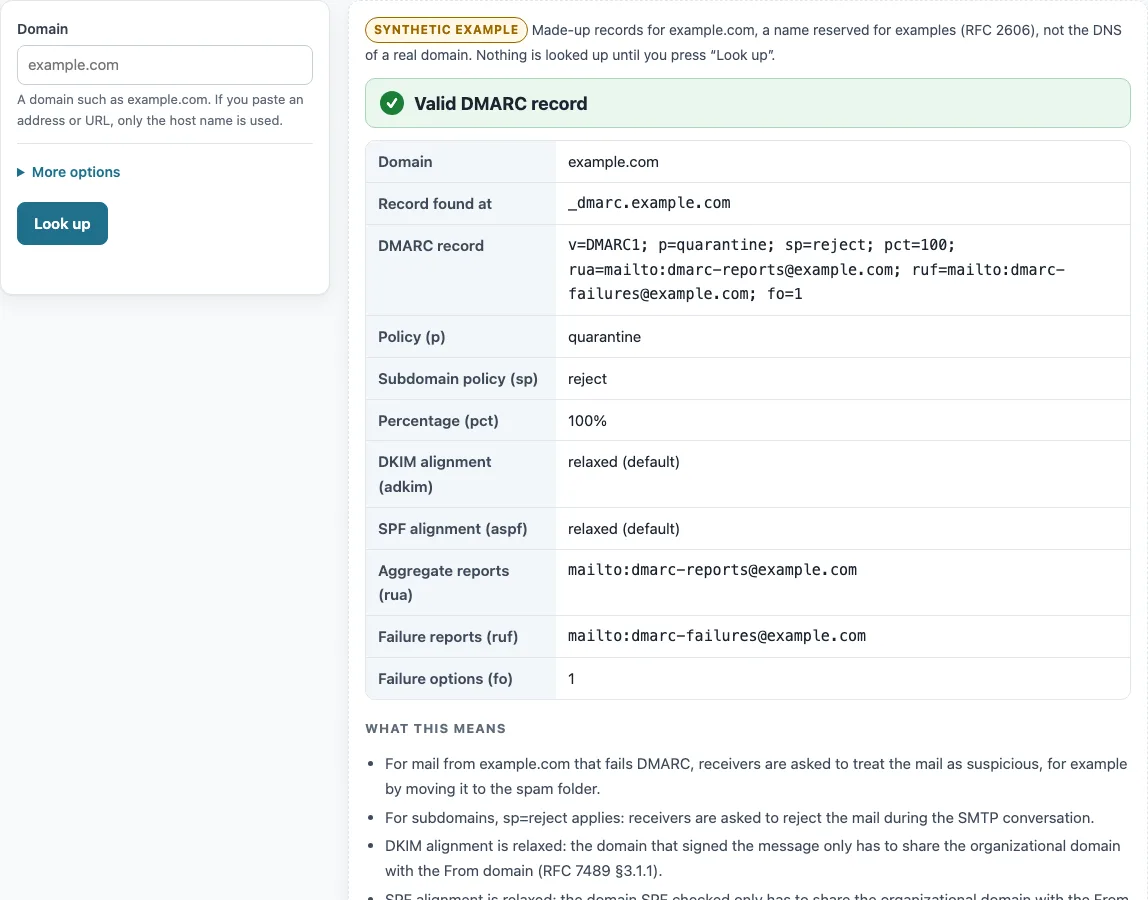
How to use the DMARC checker
- Click the Domain box and type a domain, such as example.com. Leave out any
https://or path. - Press Look up.
- Read the verdict: Valid DMARC record, DMARC record found, with warnings, DMARC record has errors, or No DMARC record for
. - Check Record found at to see whether the record came from
_dmarc.<domain>or from the organizational domain. - Read Policy (p) and, if it appears, Policy applied to this name.
- Scan Checks. Each tag is marked OK, Note, Warning or Error.
- Optional: open More options > DNS resolver to switch between Cloudflare DNS and Google Public DNS, then press Look up again.
- If Record found at shows the organizational domain, the subdomain you typed has no record of its own and inherits that policy; publish a record at
_dmarc.<subdomain>if it needs a different one.
Press Copy result to copy the output. Copy link keeps the lookup in the address bar as ?s=, so the same result can be reopened later. A ?d= address only fills in the Domain box.
For each external report address in rua or ruf, the checks also show whether the receiving domain has agreed to take your reports.
Unknown tags are listed too.
DMARC explained: what is DMARC in email and cyber security?
DMARC is a policy published in DNS that tells receiving mail servers what to do with mail that fails authentication for your domain, and where to send reports about it. It is published as a TXT record at _dmarc.<domain> (RFC 7489 §6.1, §6.6.3). A message passes DMARC when at least one authenticated identifier, an SPF-checked domain or a DKIM d= domain, aligns with the From domain (RFC 7489 §6.6.2 step 5). Relaxed alignment means the same organizational domain. Strict alignment means an exact match (§3.1.1, §3.1.2).
What does DMARC stand for?
DMARC stands for Domain-based Message Authentication, Reporting and Conformance, which is the title of RFC 7489. That RFC is an Informational document from March 2015. The name covers both the authentication checks and the reporting.
What does DMARC do?
DMARC sets the policy with the p tag. none asks receivers to take no action, quarantine asks them to treat failing mail as suspicious (for example, a spam folder), and reject asks them to refuse it during the SMTP conversation (RFC 7489 §6.3). The pct tag sets the share of failing mail the policy applies to. Below 100, reject falls back to quarantine for the rest (§6.6.4). The rua tag names addresses for aggregate reports, and ruf names addresses for failure reports. Receivers must support mailto: addresses (§6.3).
What is a DMARC record?
A DMARC record is a TXT value that starts with v=DMARC1, followed by tags. The v tag must come first, and p must follow it and is required (RFC 7489 §6.3). The version value must match precisely, so v=dmarc1 is not a DMARC record (§6.3); this tool also reads tag names as case-sensitive. Unknown tags are ignored. A repeated tag is flagged (RFC 6376 §3.2). If a name has more than one DMARC record, receivers apply no DMARC at all (RFC 7489 §6.6.3 step 5).
How to set up DMARC?
Publish one TXT record at _dmarc.<domain> that begins v=DMARC1; p=none; rua=mailto:<address>. Read the reports for a while, then move to quarantine or reject. The pct tag lets you apply a stricter policy to part of your mail first (RFC 7489 §6.6.4). This tool checks records. It does not generate them.
How to test DMARC?
Enter the domain, press Look up, and read the Checks list. A result describes the record that was published at that moment. It does not show whether your mail passes.
The tool estimates the organizational domain by taking the last two labels of the name. It uses three labels when the last two match one of about 60 built-in common two-level suffixes, such as co.uk and com.au. The Public Suffix List is not included, so for unusual suffixes the fallback may query the wrong name.
Sources (checked 13 October 2026): RFC 6376 · RFC 7489
Worked examples
| Input | Result |
|---|---|
| example.com | Valid DMARC record; policy quarantine, applied to 100% of mail |
| mail.example.com | Valid DMARC record; policy reject, applied to 100% of mail |
| example.org | DMARC record has errors; policy reject, applied to 100% of mail |
| example.net | DMARC record found, with warnings; policy none, applied to 100% of mail |
Calculated by the tool above; open it with the same values to see each step.
Frequently asked questions
What does p=none mean?
It asks receiving servers to take no action on mail that fails DMARC. If the record also has a rua address, you still receive aggregate reports (RFC 7489 §6.3).
How to check a DMARC record?
Type the domain into Domain and press Look up. The tool shows the record, each tag, and what it means under What this means.
Can this tool create a DMARC record for me?
No. It reads and checks the record that is already published. You write the TXT record and publish it at _dmarc.<domain> through your DNS provider.
Why are my DMARC reports not arriving at another domain?
The receiving domain must publish a TXT record at <your domain>._report._dmarc.<its domain> that starts with v=DMARC1. Without it, reports sent there are ignored (RFC 7489 §7.1). The tool checks this for each external rua or ruf address.
What happens if my domain has no DMARC record?
Receivers look for a record at the organizational domain, _dmarc.<organizational domain> (RFC 7489 §6.6.3). If that is missing too, the verdict is No DMARC record for
Does a valid DMARC record mean my mail will be delivered?
No. A valid verdict means the record parses correctly. Delivery depends on the receiving server and on whether your mail passes SPF or DKIM alignment, which this check does not test.
Why does the tool say v=dmarc1 does not match?
The version tag must match precisely, so it must be written v=DMARC1 (RFC 7489 §6.3). Variants such as v=dmarc1 or v=DMARC10 are reported as not matching.
Related tools
- SPF record checker: check the SPF record that DMARC alignment can depend on.
- DKIM checker: check the DKIM signature domain that DMARC can align with.
- MX lookup: see which mail servers accept mail for a domain.
- TXT record lookup: read any TXT record, including the one at
_dmarc.<domain>. - Reverse DNS lookup: check the name that belongs to a sending IP address.
- DNS propagation checker: see whether a newly published record is visible across resolvers.
- DNS lookup: run general DNS queries for any record type.