DNS Propagation Checker
Enter a name and record type to see how several public resolvers answer right now, side by side.
Recent
Your last 10 settings, saved only in this browser. Nothing is uploaded.
Get notified about new checks and updates
We send a short email only when we add a new tool or make a major change to one — no newsletter, no ads, never shared. To unsubscribe, email support@360jiance.com with the word “unsubscribe” and we delete your address. What we store.
How to use the DNS propagation checker
- Type the name you changed in “Domain name or host name”. For the root domain, enter example.com. For a subdomain or mail record, enter the full name, such as www.example.com or _dmarc.example.com.
- Choose the type in “Record type”: A (IPv4 address), AAAA (IPv6 address), CNAME (alias), MX (mail servers), NS (name servers), or TXT (text, SPF, verification).
- Optional: paste the value you just set into “Expected value (optional)”. For TXT records, a part of the record is enough.
- Click “Check propagation”.
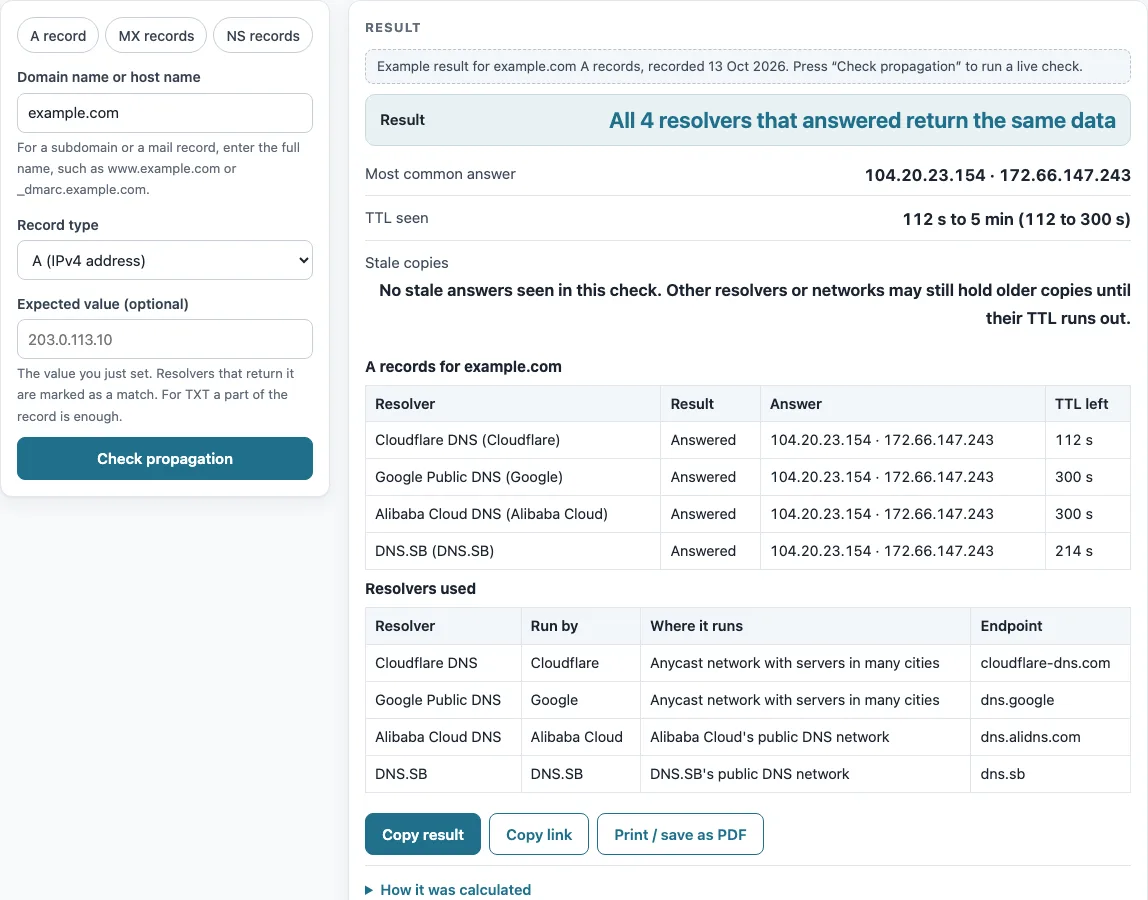
- Read “Result” first. Then check the table “
records for ”. Each resolver row shows its “Answer”, its “TTL left” and, if you entered an expected value, whether it is a “Match” or “No match”. - Look at “TTL seen” and “Stale copies” to see how long old answers may last.
The chips “A record” (example.com), “MX records” (gmail.com) and “NS records” (example.com) fill in a common check for you. The “Resolvers used” table lists who runs each resolver, where it runs and its endpoint.
Use “Copy result” to copy the summary, “Copy link” to share this check, or “Print / save as PDF” to keep a record.
Run the check again after a few minutes: answers change as cached copies expire.
How long does DNS propagation take?
Propagation is not a push. Each resolver keeps a copy of a record until its TTL runs out, then asks again. A change therefore arrives as old copies expire. For resolvers that cached the old record, the wait is up to that record’s TTL. RFC 1034 §3.6 describes the TTL as a time limit on how long a resource record can be kept in a cache.
Remaining TTL is what matters. For example, the example.com A record has a TTL of 300 s, as seen at Google and AliDNS. Cloudflare showed 112 s remaining because its cache fetched the record earlier. The longest remaining value you see is the longest a resolver may still serve the old answer.
Name server changes take longer. Changing name servers at the registrar changes the delegation held in the parent zone. Observed on 2026-10-13 with dig at the .com servers, example.com NS has a TTL of 172800 s (2 days), so resolvers may hold the old delegation that long. Before a planned change, lower the TTL: RFC 1034 §3.6 notes that “if a change can be anticipated, the TTL can be reduced prior to the change to minimize inconsistency during the change, and then increased back to its former value following the change.” Lower it at least one old TTL ahead, so the shorter value has reached the caches.
Why do I see the old site and my friend the new one?
You and your friend are probably using different caches, and each cache expires at its own time. Your ISP, router, operating system and browser keep their own caches too, and this tool cannot see them. It shows four public resolvers side by side, so you can see which ones already return the new answer and which still hold the old one.
A resolver that cached the old record just before your change can serve it for up to the full TTL. A “propagated” result therefore describes those four resolvers at one moment. It does not show what every device on every network sees.
Sources (checked 13 October 2026): RFC 1034 · RFC 2308
Worked examples
| Input | Result |
|---|---|
| A record of example.com | All 4 resolvers that answered return the same data — 104.20.23.154 · 172.66.147.243 |
| MX record of gmail.com | All 4 resolvers that answered return the same data — 5 gmail-smtp-in.l.google.com · 10 alt1.gmail-smtp-in.l.google.com · 20 alt2.gmail-smtp-in.l.google.com · 30 alt3.gmail-smtp-in.l.google.com · 40 alt4.gmail-smtp-in.l.google.com |
| TXT record of example.com, expected v=spf1 -all | 4 of 4 resolvers return the expected value — _k2n1y4vw3qtb4skdx9e7dxt97qrmmq9 · v=spf1 -all |
| A record of example.com, expected 104.20.23.154 | 3 of 4 resolvers return the expected value — 104.20.23.154 · 172.66.147.243 |
Calculated by the tool above; open it with the same values to see each step.
Frequently asked questions
Is this checking servers in every country?
No. The tool asks four large public resolvers: Cloudflare DNS, Google Public DNS, Alibaba Cloud DNS and DNS.SB. Your ISP’s resolver is not included. The browser cannot see which server location answered, so the page never names a country or city for an answer.
Why does a resolver say “Name does not exist”?
That is the NXDOMAIN answer, which means the name has no records. The resolver may have cached that answer from before you created the record. Negative answers are cached for the TTL taken from the zone’s SOA, the smaller of SOA MINIMUM and the SOA TTL (RFC 2308 §5). Wait for that time to pass, then check again.
Can I check MX / TXT / CNAME / NS?
Yes. Pick the type in “Record type”. MX answers are shown by preference number. For a subdomain or mail record, enter the full name, such as _dmarc.example.com.
Does a “Result” of agreement mean every network sees the new value?
No. The result describes what the four resolvers returned at that moment, and results change from second to second as caches refresh. A propagated result does not prove that every ISP, corporate network, operating system or browser cache holds the new value.
How do I check a domain verification token?
Set “Record type” to TXT and paste the token into “Expected value (optional)”. Each resolver is then marked “Match” or “No match”. For TXT, a substring of at least 4 characters is enough to match.
Why does a resolver show “No match” when I entered a value?
The answer it returned differs from the value you entered. Matching ignores letter case, trailing dots and the order of answers. It also ignores TXT quote and split differences, so only real differences in the data cause a “No match”. An old value still held in a cache is the most common reason.
Related tools
- WHOIS lookup: use it to see the registration details of a domain.
- Domain expiration checker: use it to check when a domain’s registration expires.
- NS lookup: use it to see which name servers a domain lists.
- DNSSEC checker: use it to check whether a domain uses DNSSEC.
- SSL checker: use it to check the SSL certificate on a site.
- DNS lookup: use it to look up records for a name without comparing resolvers.
- CAA record lookup: use it to see which certificate authorities a domain allows.