DNS Record Types
Browse the common DNS record types with examples, then look one up live for any domain.
Recent
Your last 10 settings, saved only in this browser. Nothing is uploaded.
Get notified about new checks and updates
We send a short email only when we add a new tool or make a major change to one — no newsletter, no ads, never shared. To unsubscribe, email support@360jiance.com with the word “unsubscribe” and we delete your address. What we store.
How to use the DNS record types tool
- In the “Filter the table” box, type a type name, number, RFC number or word, such as MX, 15, RFC 1035 or mail. The rows narrow as you type.
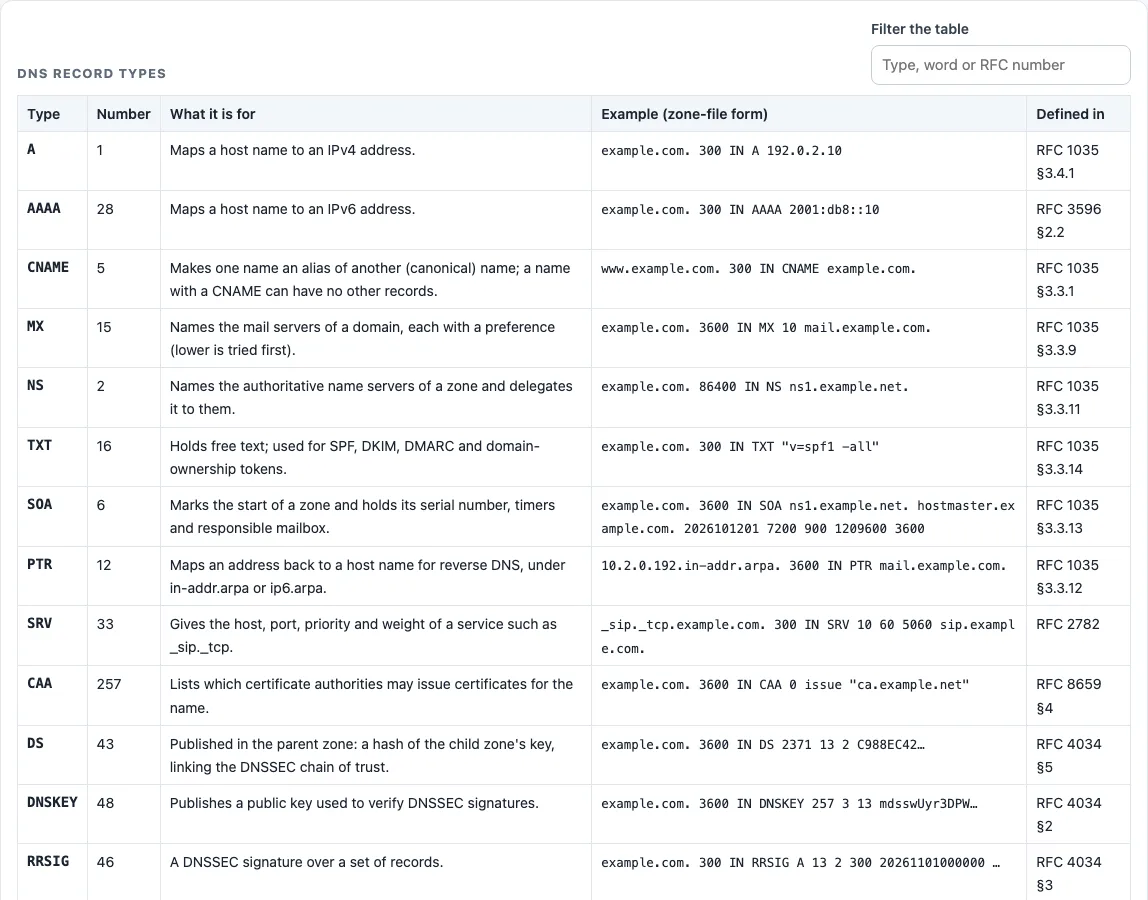
- Read the “Type”, “Number”, “What it is for”, “Example (zone-file form)” and “Defined in” columns. Rows run from the most common types to the least common.
- Scroll down to the live box.
- Type a domain in “Domain name”, such as example.com.
- Open “Record type” and choose one of the 16 types offered.
- Open “Resolver” and pick the resolver to ask.
- Press “Look up”. Each press makes one query.
- Read “Records”, “Type”, “Status” and the checks. Then read the table titled “
records of ”, with the columns Type, Name, TTL (s) and Value.
“Copy result” copies the output, and “Copy link” copies a link you can share. The live box does not offer all 23 types, so use the reference table alone for types such as HINFO, SPF or SVCB.
Below the result, “The same query on the command line” lists the matching dig and nslookup commands, so you can repeat the check from a server or compare it with your own network’s resolver. To compare resolvers, run the lookup once with “Cloudflare DNS” and once with “Google Public DNS”: different answers usually mean one of them still holds an older cached copy.
DNS record types explained
A DNS record type is the label on one kind of entry in a domain’s DNS zone, and each type has a number in the IANA registry. The type tells a resolver what the value means: A holds an IPv4 address, MX names a mail server with a preference, and TXT holds free text.
The table starts with the types a website owner deals with first: A (with AAAA for IPv6) for the address, CNAME for an alias, MX for mail, and TXT for verification and email authentication. A few rules matter here. A name with a CNAME has no other records (RFC 2181 §10.1). Every zone needs at least two NS records (RFC 1034 §4.1). A null MX is written “0 .” (RFC 7505).
For example, a live lookup of example.com for A returns two records, 104.20.23.154 and 172.66.147.243. A lookup for MX returns one record, “0 .”. The table’s examples use documentation values instead: 192.0.2.0/24 (RFC 5737), 2001:db8::/32 (RFC 3849) and example.com (RFC 2606).
For IPv6, AAAA (28) holds an IPv6 address (RFC 3596 §2.2). Reverse lookups use PTR (12) under ip6.arpa (RFC 3596 §2.5).
Less common types include the DNSSEC set (DS 43, DNSKEY 48, RRSIG 46, NSEC 47, NSEC3 50), TLSA 52 for DANE, SSHFP 44, and HTTPS 65 and SVCB 64. Hashes, keys and signatures are shortened with “…”. Resolvers print DNSSEC and TLSA/HTTPS data in presentation format, and the tool shows that text unchanged.
ANY (discouraged, RFC 8482), AXFR/IXFR zone transfers, and ANAME/ALIAS are not covered. The last two are provider features, not DNS types.
DNS types explained
DNS types are the record types a zone can hold, and the query type is the number of the record type a lookup asks for. Each query carries one QTYPE, so asking for MX returns only mail server records.
You can ask one type at a time with dig example.com MX +short or nslookup -type=MX example.com. DoH APIs accept either the name or the number, such as type=MX or type=15.
DNS server types are a different question. Recursive resolvers, authoritative servers and forwarders are roles that a record-type table does not describe. To check the name servers behind a domain, use the NS lookup.
Sources (checked 13 October 2026): RFC 1034 · RFC 1035 · RFC 2181 · RFC 2606 · RFC 3596 · RFC 3849 · RFC 5737 · RFC 7208 · RFC 7505 · RFC 8482 · IANA
Worked examples
| Input | Result |
|---|---|
| A of example.com | 2 records |
| MX of example.com | 1 record |
| NS of example.com | 2 records |
| DS of example.com | 1 record |
| CAA of github.com | 7 records |
Calculated by the tool above; open it with the same values to see each step.
Frequently asked questions
What are the 3 DNS record types most websites need?
A or AAAA for the address, CNAME for an alias, and MX for mail. TXT is also common, for verification tokens and email authentication records such as SPF.
What are the IPv6 DNS record types?
AAAA (28) holds an IPv6 address, as defined in RFC 3596 §2.2. PTR (12) maps an IPv6 address back to a name under ip6.arpa for reverse DNS.
Is SPF still a DNS record type to use?
SPF (99) is obsolete. RFC 7208 §14.1 says its use is no longer appropriate for SPF version 1. SPF policies are published in TXT records.
Are all 23 record types available in the live lookup?
No. The “Record type” menu offers 16: A, AAAA, CNAME, MX, NS, TXT, SOA, PTR, SRV, CAA, DS, DNSKEY, HTTPS, TLSA, NSEC and SSHFP. The other seven, including HINFO, SPF and SVCB, appear in the reference table only.
Does the lookup send my data anywhere?
Live lookups send only the domain name or IP address to the resolver you choose. No sign-up is needed.
What does “no record of the type” mean?
This check is informational. It means the resolver returned no records of the type you asked for when the query ran. The result describes that moment only, so check again after any DNS change.
Related tools
- DNS lookup: run a general lookup when you do not yet know which record type you need.
- A record lookup: check the IPv4 address a hostname points to.
- MX lookup: see which mail servers accept mail for a domain.
- TXT record lookup: read verification tokens and email authentication records.
- CNAME lookup: confirm whether a name is an alias and where it points.
- NS lookup: list the authoritative name servers for a domain.
- Reverse DNS lookup: find the name published for an IP address.
- DNS propagation checker: compare what different resolvers return after a change.