DNSSEC Checker
Type a domain to see whether DNSSEC is on and validating, with its DS, DNSKEY and RRSIG details.
Recent
Your last 10 settings, saved only in this browser. Nothing is uploaded.
Get notified about new checks and updates
We send a short email only when we add a new tool or make a major change to one — no newsletter, no ads, never shared. To unsubscribe, email support@360jiance.com with the word “unsubscribe” and we delete your address. What we store.
This DNSSEC checker tells you whether a domain’s DNS data is signed with DNSSEC and whether validating resolvers confirm those signatures. Type a domain into “Domain name” and press “Check DNSSEC” to get a status such as “DNSSEC is on and validating” or “DNSSEC is not enabled”. It is a free online DNSSEC lookup with no sign-up.
The tool asks Cloudflare DNS and Google Public DNS for the domain’s DNSKEY and DS records. The DS digest check runs in your browser. Nothing is sent until you press the button, and the page shows a labelled example for cloudflare.com first.
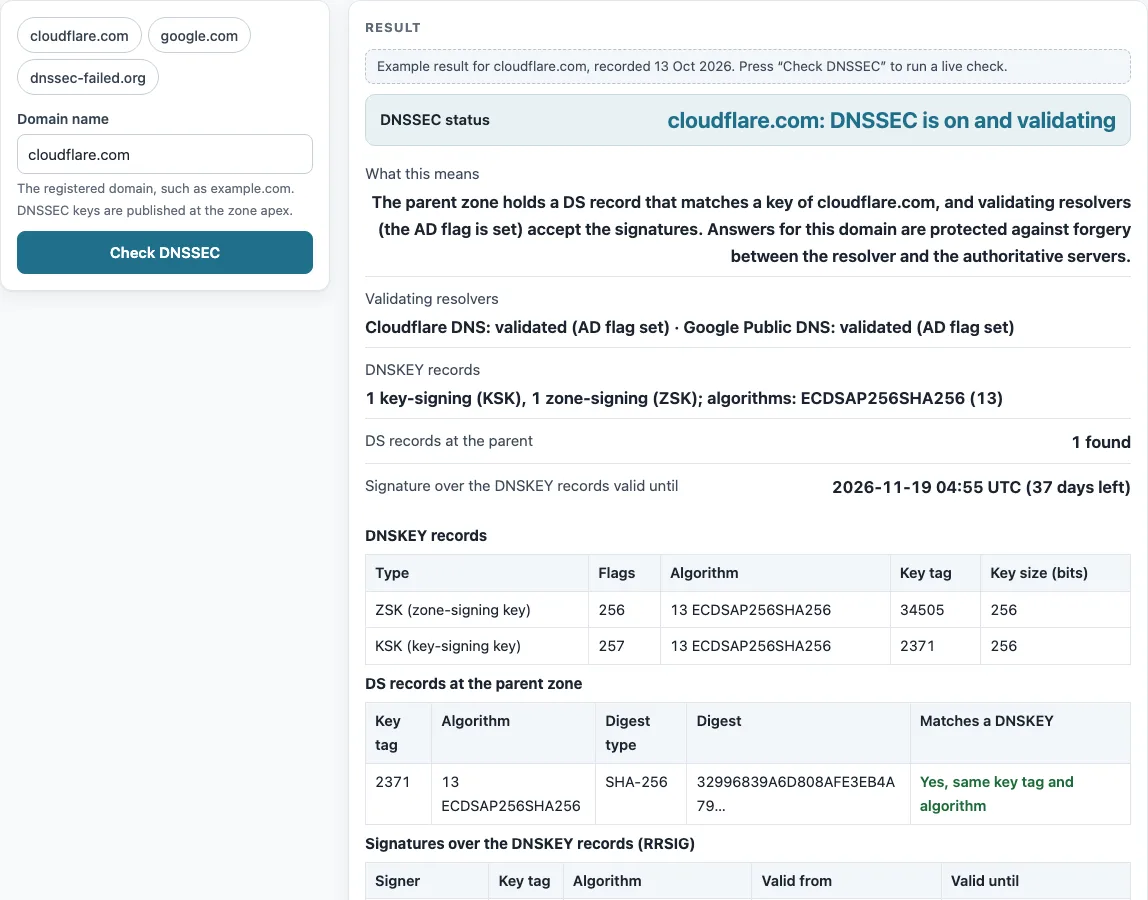
How to use the DNSSEC checker
- Type the registered domain, such as example.com, into the “Domain name” field. DNSSEC keys are published at the zone apex, so enter the domain itself rather than a subdomain.
- Or click one of the chips “cloudflare.com”, “google.com” or “dnssec-failed.org” to fill the field with a sample domain.
- Press “Check DNSSEC”. The tool queries Cloudflare DNS and Google Public DNS.
- Read the “DNSSEC status” row first. Its large text gives the verdict, and “What this means” explains it in plain words.
- Check “Validating resolvers” to see whether each resolver validated the answer, found keys without validation, or returned SERVFAIL.
- Review “DNSKEY records”, “DS records at the parent” and “Signature over the DNSKEY records valid until”. In the DS table, “Yes, digest verified” means the DS digest matches the key.
When you are done, “Copy result” copies the output, “Copy link” copies a link to the check, and “Print / save as PDF” keeps a printed copy. Results describe what the check saw at the moment you ran it.
If the verdict says DNSSEC is broken, compare the key tags in “DS records at the parent” with the DNSKEY table: a DS record whose key tag matches no key, or whose digest does not match, is the usual cause.
What is DNSSEC and how it works
DNSSEC stands for Domain Name System Security Extensions. It adds digital signatures to DNS data so that resolvers can detect forged answers (RFC 4033 §1).
The zone signs each record set and publishes the signatures as RRSIG records. Its public keys are published as DNSKEY records. Keys with flag 257 are key-signing keys (KSK), and keys with flag 256 are zone-signing keys (ZSK) (RFC 4034 §2.1.1). The parent zone then publishes a DS record, which is a hash of the child’s key-signing key. This links trust from the root down to the domain (RFC 4033 §3, RFC 4034 §2, §3, §5).
A key tag is a short checksum of a DNSKEY, computed as in RFC 4034 Appendix B. Key tags are not unique, so they only narrow down which key a DS record refers to. The DS digest check confirms the match. Algorithm 13, ECDSAP256SHA256, is a MUST in RFC 8624 §3.1 and is the recommended choice for new deployments (§3.2). Algorithms RSASHA1 and RSASHA1-NSEC3-SHA1 are not recommended for signing.
Signatures also have a validity period. Validators require the current time to fall between a signature’s inception and expiration times (RFC 4035 §5.3.1). If the signer stops re-signing the zone, validating resolvers will reject the domain’s answers.
What does DNSSEC protect against?
DNSSEC protects against forged or tampered DNS answers, such as cache poisoning and spoofed responses. A validating resolver rejects data whose signatures do not verify.
It does not encrypt queries. RFC 4033 §1 states that these extensions provide origin authentication and integrity protection but do not provide confidentiality.
Sources (checked 13 October 2026): RFC 4033 · RFC 4034 · RFC 4035 · RFC 8624 · IANA
Worked examples
| Input | Result |
|---|---|
| cloudflare.com | cloudflare.com: DNSSEC is on and validating |
| google.com | google.com: DNSSEC is not enabled |
| dnssec-failed.org | dnssec-failed.org: DNSSEC is broken (validation fails) |
| cloudflare.com | cloudflare.com: keys published but no DS record at the parent |
Calculated by the tool above; open it with the same values to see each step.
Frequently asked questions
How do I check whether a domain has DNSSEC?
Enter the domain in “Domain name” and press “Check DNSSEC”. “DNSSEC is on and validating” means a DS record at the parent matches a DNSKEY in the zone and the resolvers set the AD flag.
What does “DNSSEC unsigned” mean?
It means the domain has no DS record at its parent and no DNSKEY in its zone. Its answers are not signed, so they cannot be verified, but the domain still works.
What is DNSSEC validation?
Validation is the check a resolver makes by verifying signatures from the root down to the answer. When everything verifies, the resolver sets the AD flag (RFC 4035 §5, §3.2.3).
My site fails on some networks since I enabled DNSSEC. Why?
The most likely cause is a DS record that does not match the key, or signatures that have expired. The tool reports “DNSSEC is broken (validation fails)” when a validating resolver returns SERVFAIL but the same query with CD=1 gets an answer. Check “DS records at the parent” for “No, the digest does not match” or “No DNSKEY with this key tag”.
What does this checker not test?
It checks the apex only, so a subdomain inside a signed zone may show as unsigned. It uses two resolvers and relies on their AD flag rather than validating the full RRSIG chain itself. It does not check NSEC or NSEC3 records.
Related tools
- WHOIS lookup: Use it to see registration details for a domain, including the DS records its registry holds.
- Domain expiration checker: Use it to see when a domain registration is due to expire.
- NS lookup: Use it to find the nameservers that serve a domain’s zone.
- DNS propagation checker: Use it to see whether a DNS change has reached resolvers in different places.
- SSL checker: Use it to inspect a site’s TLS certificate.
- DNS lookup: Use it to look up general DNS records for a domain.
- CAA record lookup: Use it to check which certificate authorities a domain allows to issue certificates.