Domain Expiration Lookup and Checker
Type one domain, or up to ten one per line, to see their expiry dates and days left.
Recent
Your last 10 settings, saved only in this browser. Nothing is uploaded.
Get notified about new checks and updates
We send a short email only when we add a new tool or make a major change to one — no newsletter, no ads, never shared. To unsubscribe, email support@360jiance.com with the word “unsubscribe” and we delete your address. What we store.
How to use the domain expiration checker
- Click the “Single domain” chip to run a check on example.com, or type your own domain into “Domain names (one per line, up to 10)”.
- To check several domains, put one on each line. Commas, semicolons and spaces also separate names. Duplicates are dropped, and a full URL is cut down to its host name.
- Press “Check expiration”. The domains are checked one after another, about 0.7 seconds apart.
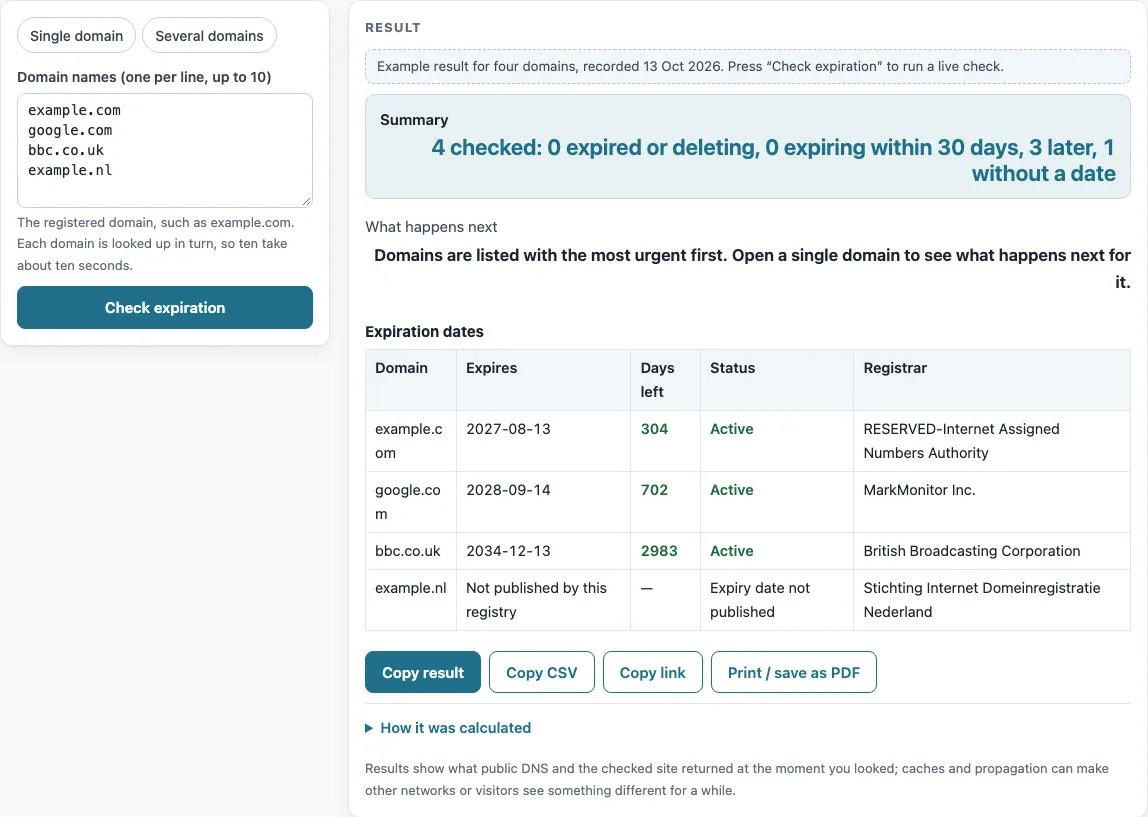
- Read the “Expiration dates” table. It lists the most urgent domains first, with the columns “Domain”, “Expires”, “Days left”, “Status” and “Registrar”.
- For a single domain, also read “Time left” and “What happens next”.
- For several domains, read the “Summary” line and the “What happens next” notes.
If a name is past the first 10, the tool ignores it and shows a warning. Invalid names are listed in a warning and skipped.
“Copy CSV” copies the table as CSV with the columns domain, expires, days_left, status and registrar. You can paste it into a spreadsheet. “Copy result” copies the readable result, “Copy link” copies a link to the page, and “Print / save as PDF” prints the result or saves it as a PDF.
The chips “Single domain” and “Several domains” load a ready-made example of each mode.
How do I check when a domain expires?
The checker reads the expiration date from the registry’s RDAP record, where it appears as an expiration event defined in RFC 9083, section 4.5. “Days left” is the number of whole days from now until that moment, and a negative number means the domain has already expired.
RDAP is provided by gTLD registries and some country-code registries. Other registries have no RDAP service, so the tool cannot read their dates. Some registries publish no expiry date at all. The date shown is the registry’s date, so the registrar’s renewal portal is the authority for the exact renewal deadline and the price.
“Expires within 30 days” is a highlight the tool applies to its own list. It is not a registry rule. Domains whose status includes a redemption period or pending delete appear as “In redemption or pending delete” whatever their date.
What happens when a domain expires?
Expiry starts a sequence of steps, and the timing depends on the registry and the registrar. For most gTLD domains, the ICANN Expired Registration Recovery Policy (ERRP) sets the main rules. Country-code registries set their own rules.
Before expiry, registrars must notify the registrant at least twice, about one month and about one week ahead. The compliant windows are 26–35 days and 4–10 days (ERRP §2.1.1). If the domain is neither renewed nor deleted, the registrar must send another notice with renewal instructions within five days after expiry (ERRP §2.1.2). The registrant can renew during this time (ERRP §2.2.5).
Where the registry allows it, DNS resolution must be interrupted for at least the last 8 consecutive days before deletion (ERRP §2.2.2–2.2.3). A website or email on the domain can stop working before the domain is deleted.
After deletion, gTLD registries must offer a 30-day Redemption Grace Period (ERRP §3.1–3.3). The registrar must let you redeem the domain during this period, which usually costs a fee. DNS is disabled, and transfers are not allowed. ICANN’s EPP guidance describes the next stage as a 30-day hold, followed by about five calendar days of pending delete. After that the domain is purged and becomes available for registration.
Some registries auto-renew an expired domain during an autoRenewPeriod. If the registrar deletes it in that window, the registry credits the renewal. Registrars differ in how long they accept a normal renewal after expiry and in what they charge, so check the registrar.
Sources (checked 13 October 2026): RFC 9083 · ICANN · ICANN (2)
Worked examples
| Input | Result |
|---|---|
| example.com | example.com: 2027-08-13 (304 days left) |
| google.com, bbc.co.uk | google.com: 2028-09-14 (702 days left); bbc.co.uk: 2034-12-13 (2983 days left) |
| example.nl | example.nl: — (Not published by this registry) |
| lapsed-example.org | lapsed-example.org: 2026-10-01 (Expired 12 days ago) |
Calculated by the tool above; open it with the same values to see each step.
Frequently asked questions
Can I check several domains at once?
Yes. Put up to 10 domains in “Domain names (one per line, up to 10)”, one per line. “Copy CSV” exports the results for a spreadsheet.
Why does it say “Expiry date not published”?
Some registries, such as .nl, do not include an expiration event in their RDAP record, so the tool has no date to show. Ask the registrar or check your registrar account for the renewal date.
Why “No data: this top-level domain has no RDAP service”?
The registry for that extension publishes no RDAP server, and a browser cannot read port-43 WHOIS, so the tool cannot fetch the record. Examples include .io, .de, .cn, .ru, .it and .co.jp. Use the registrar’s own portal for these domains.
Is the date the checker shows the same as my renewal deadline?
Not always. The date comes from the registry’s record, and the registrar’s renewal portal sets the exact deadline and price. Results show what the check saw at that moment.
Does the checker send my domain anywhere?
Live lookups send only the domain name to the lookup service, rdap.org. Nothing else is sent.
Does the checker renew or watch my domains?
No. It reads the dates once, when you press the button. To renew, use your registrar’s account; scheduled reminders are part of the planned Pro option.
Related tools
- SSL checker: use it to see the certificate details and expiry for a site’s HTTPS connection.
- SSL certificate decoder: use it to read the fields inside a certificate you already have.
- CSR decoder: use it to inspect a certificate signing request before you send it to a certificate authority.
- CAA record lookup: use it to see which certificate authorities a domain allows to issue certificates.
- DNSSEC checker: use it to check whether a domain’s DNS records are signed with DNSSEC.
- HSTS checker: use it to check whether a site sends the Strict-Transport-Security header.
- Security headers checker: use it to see which HTTP security headers a site returns.