HSTS Checker
Enter a host name, or paste the header, to check its HSTS policy and preload readiness.
How this check works: our server sends one ordinary GET request per redirect step (at most 10) to the public address you enter, the same request a browser would make, and shows you a short summary — status codes, selected response headers and, for robots.txt, the file itself (up to 64 KB). It never sends data on your behalf, never contacts private or internal addresses, and does not log or store what you type; results are cached for 10 minutes and each visitor can run 10 checks per minute.
Recent
Your last 10 settings, saved only in this browser. Nothing is uploaded.
Get notified about new checks and updates
We send a short email only when we add a new tool or make a major change to one — no newsletter, no ads, never shared. To unsubscribe, email support@360jiance.com with the word “unsubscribe” and we delete your address. What we store.
The HSTS checker reads a Strict-Transport-Security (HSTS) header and reports whether it is valid, how long it lasts, and whether it meets the requirements for HSTS preload. Enter a domain and press Check HSTS, or paste a header line to read it without a live lookup.
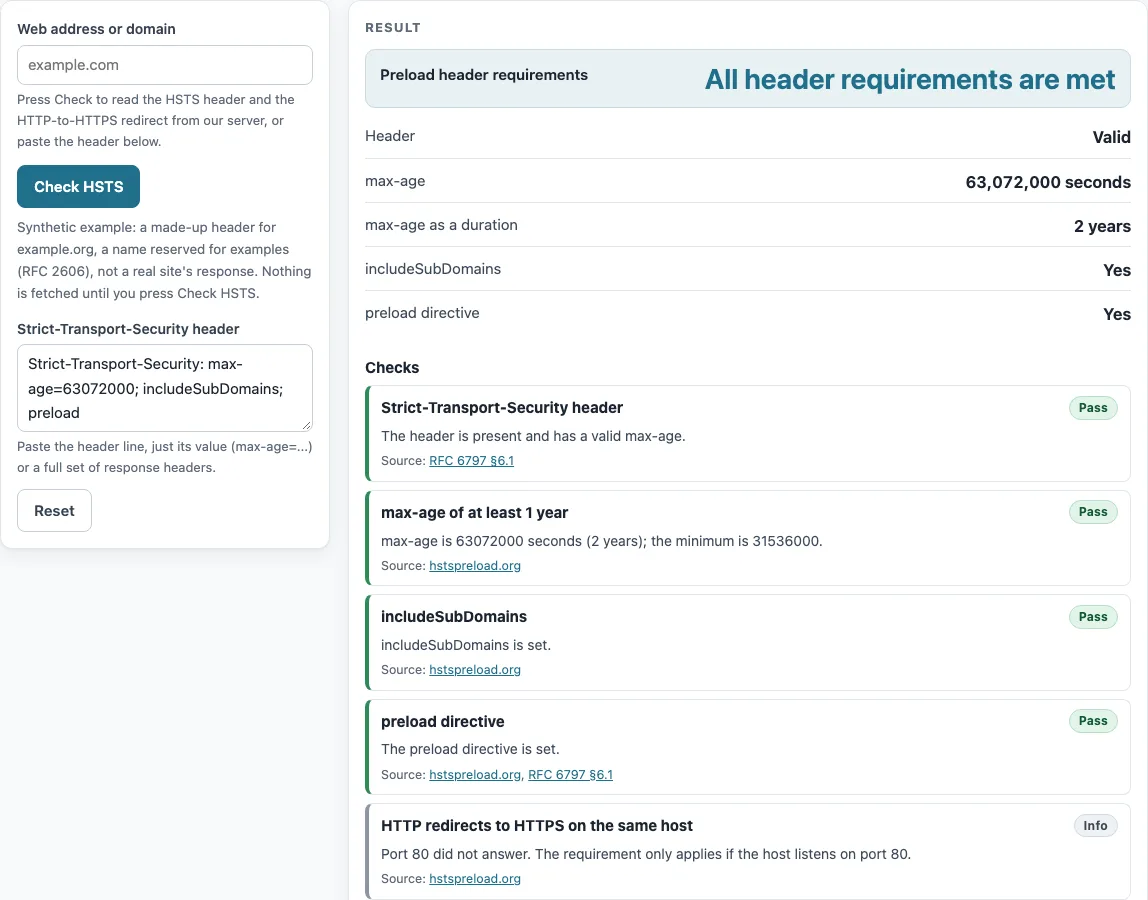
The checker shows the header status, the max-age value in seconds and as a duration, and whether includeSubDomains and the preload directive are set. It then marks each hstspreload.org requirement as Pass, Fails or Info. For domain checks, this site’s read-only check service asks the domain over HTTPS and over plain HTTP. The tool is free and needs no sign-up. Results describe what the check saw at the moment you ran it.
How to use the HSTS checker
- Type a web address or domain into the “Web address or domain” box, for example example.org.
- Press “Check HSTS”. The check reads the header from the first HTTPS response for the base host, then checks whether plain HTTP redirects to HTTPS on the same host.
- Read the “Header” line. “Valid” means the header parsed, “Invalid” means it did not, and “Not set” means no header was found.
- Compare “max-age”, “max-age as a duration”, “includeSubDomains” and “preload directive” with what you expected to see.
- Read “Preload header requirements”. It shows either “All header requirements are met” or “Not met” with the reasons.
- Open “Checks” to see each requirement marked Pass, Fails or Info.
- To test a header before you publish it, paste it into “Strict-Transport-Security header”. You can paste only the value or a full header block.
The page opens with a made-up example for example.org, labelled as synthetic, so you can see a complete result before you enter your own domain.
Use the paste box to try a new header value before you deploy it: the requirements update as you type.
The checks list each preload requirement on its own line, so you can see which one fails and fix it before you submit the domain.
What is HSTS?
HSTS stands for HTTP Strict Transport Security. It is a response header, defined in RFC 6797, that tells a browser to use only HTTPS when it connects to a host. The browser keeps this rule for the number of seconds given in max-age. A typical header looks like this: Strict-Transport-Security: max-age=63072000; includeSubDomains; preload.
Under RFC 6797 §6.1, directive names are case-insensitive, order does not matter, each directive appears once, and max-age is required. Unknown directives are ignored. This is why preload is not defined in RFC 6797 but is recognized by hstspreload.org. If a response carries several STS headers, browsers process only the first one (RFC 6797 §8.1).
How do I check whether my site uses HSTS?
Enter the domain and press Check HSTS. The checker reads the header from the first HTTPS response for the base host, not from a later redirect target. That matters because a redirect to another host would show a different header from the one you meant to test.
The check also requests the domain over plain HTTP to see whether it redirects to HTTPS on the same host. A redirect passes only if the redirect location’s host matches the host you typed. A “Not set” result means the base host’s first HTTPS response carried no header. It does not prove that no page on your site sends one, so compare the result with the pages you care about.
For preload, the header must be on the base domain itself, such as example.com, not only on www.example.com, because the preload list covers the domain and all its subdomains.
Sources (checked 13 October 2026): RFC 6797 · hstspreload.org
Worked examples
| Input | Result |
|---|---|
| max-age=31536000; includeSubDomains; preload | Header requirements met: Yes; max-age 1 year |
| max-age=31536000 | Header requirements met: No; max-age 1 year |
| max-age=300 | Header requirements met: No; max-age 5 minutes |
| max-age=0 | Header requirements met: No; max-age 0 seconds |
| includeSubDomains; preload | Header requirements met: No; max-age - |
Calculated by the tool above; open it with the same values to see each step.
Frequently asked questions
How do I add HSTS?
Send Strict-Transport-Security: max-age=31536000; includeSubDomains on your HTTPS responses, and add preload only after you have read the preload requirements. Start with a shorter test value if you are unsure, because browsers keep using HTTPS for the whole max-age period. OWASP recommends max-age=63072000 with includeSubDomains and preload, and warns that misconfiguration can lock users out for that period.
What are the HSTS preload requirements?
The hstspreload.org requirements are: a valid certificate; a redirect from HTTP to HTTPS on the same host if the host listens on port 80; all subdomains served over HTTPS, including www if a DNS record exists; and an HSTS header on the base domain with max-age of at least 31536000, includeSubDomains and preload. Any extra redirect on the HTTPS site must still carry the HSTS header. The minimum max-age is one year, so 31535999 seconds fails and 31536000 seconds passes.
Is my domain on the preload list?
This tool cannot tell you. It cannot read the browsers’ preload list, so the Checks section links to the lookup instead of showing a result. The preload list matters because the first request to a host a browser has never seen can still go over HTTP (RFC 6797 §14.6). The list closes that gap for listed domains only.
Can I send HSTS on http://?
No. Browsers ignore the header over plain HTTP, and it must not be sent there (RFC 6797 §8.1, §7.2). Send it only on HTTPS responses, and make sure the HTTP version of the host redirects to HTTPS on the same host. The checker tests that redirect.
Does the checker test subdomains?
No. Subdomains are not checked, even though preload requires every subdomain to work over HTTPS. To check a subdomain, enter it as its own domain in the checker. Note that the subdomain’s result does not confirm that its certificate or redirects are correct.
What does max-age=0 do?
max-age=0 tells the browser to delete the policy it has stored for the host (RFC 6797 §8.1). The checker shows a warning when it sees this value. It is useful when you want to switch off HSTS, but browsers will stop enforcing the policy only after they receive the header.
Related tools
- SSL checker: use it to see whether a domain’s HTTPS certificate is valid before you enable HSTS.
- Security headers checker: use it to review other response headers alongside HSTS.
- SSL certificate decoder: use it to read the fields of a certificate you have on hand.
- CAA record lookup: use it to see which certificate authorities a domain allows to issue certificates.
- DNSSEC checker: use it to check whether a domain’s DNS records are signed.