MX Lookup
Type a domain to see which mail servers receive its email, in order, with their addresses.
Recent
Your last 10 settings, saved only in this browser. Nothing is uploaded.
Get notified about new checks and updates
We send a short email only when we add a new tool or make a major change to one — no newsletter, no ads, never shared. To unsubscribe, email support@360jiance.com with the word “unsubscribe” and we delete your address. What we store.
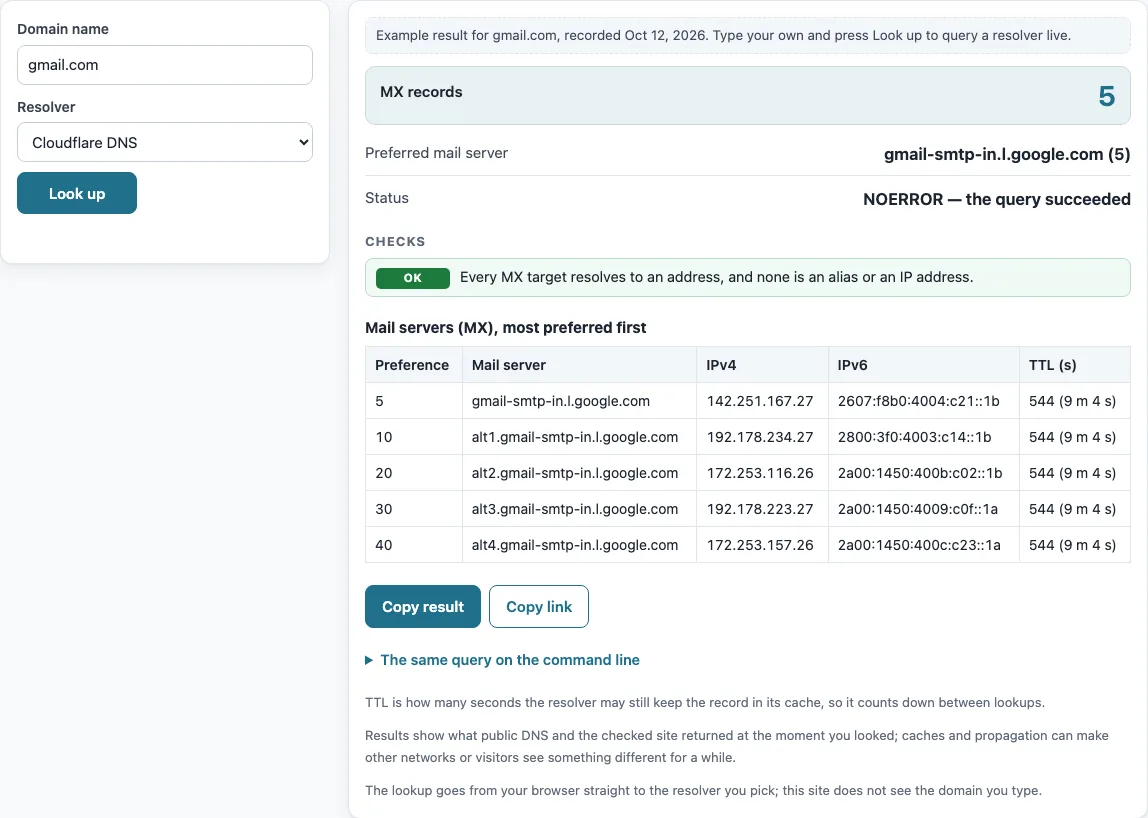
How to use the MX lookup
- Click the “Domain name” box and type the domain, such as example.com. Enter only the domain, not an email address or a full web address.
- Open the “Resolver” menu and pick the resolver you want to query.
- Press “Look up”.
- Read “MX records” for the count, or “Null MX (accepts no mail)” if the domain has a null MX.
- Check “Preferred mail server” and “Status” for a summary.
- Review the list of checks. Each one explains a problem, warning or note about the DNS setup.
- Read the table “Mail servers (MX), most preferred first”. It has the columns Preference, Mail server, IPv4, IPv6 and TTL (s).
When you have a result, press “Copy result” to copy the full output, or “Copy link” to copy a link to this lookup.
Below the result, “The same query on the command line” lists the matching dig and nslookup commands, so you can repeat the check from a server or compare it with your own network’s resolver. To compare resolvers, run the lookup once with “Cloudflare DNS” and once with “Google Public DNS”: different answers usually mean one of them still holds an older cached copy.
Null MX records are shown as such.
MX record meaning: what is an MX record?
An MX record, short for mail exchanger record (people also search for “mail exchanger MX records”), is a DNS resource record that tells senders which host accepts email for a domain. Each MX record holds two things: a preference number and a host name. For example, an MX record of “10 mail.example.com” sends mail to mail.example.com with preference 10. The host name must resolve to an address record, and it cannot be a CNAME alias or an IP address typed in place of a name.
What does the preference number in an MX record mean?
The preference number sets the order in which senders try mail servers. Lower numbers are tried first. If several servers share the same preference, RFC 5321 §5.1 says the sender picks among them at random, which spreads the load. The table “Mail servers (MX), most preferred first” follows this order, sorted by preference and then by name.
How do you find and check the MX records for a domain?
Enter the domain in the “Domain name” box and press “Look up”. The tool queries the MX records of the domain, then the A and AAAA records of each mail server, up to 20 servers. If you prefer the command line, run dig +noall +answer example.com MX or nslookup -type=MX example.com.
What happens when a domain has no MX record?
When a domain has no MX record, “MX records” shows 0. RFC 5321 §5.1 then lets senders use the domain’s own address record as an implicit MX with preference 0. The checks show a warning in this case. If the domain has neither an MX record nor an address record, the checks show a problem, because mail has nowhere to go.
A null MX is different. It is a single MX record with preference 0 and “.” as the exchange. RFC 7505 §3 says this means the domain accepts no email, and the domain must not publish any other MX record. The example.com domain uses this setup, so the tool shows “Null MX (accepts no mail)”.
How do you verify that an MX record is working?
The tool checks the DNS side of an MX record. Every MX target must resolve to an address, and it must not be an alias (RFC 2181 §10.3) or an IP address (RFC 5321 §5.1, RFC 1035 §3.3.9). When all targets pass, the check reads “Every MX target resolves to an address, and none is an alias or an IP address.” The tool does not test the SMTP connection, so a passing result shows what DNS returned at that moment, not whether a message will be delivered.
Can you look up the MX record history of a domain?
The tool shows only the current DNS answers. It reports what the resolver returned when you pressed “Look up”, and it does not show earlier MX records. The TTL (s) column shows how many seconds resolvers may keep each answer before they ask again. To see past changes, you need a separate source that keeps DNS history.
Sources (checked 13 October 2026): RFC 1035 · RFC 2181 · RFC 5321 · RFC 7505
Worked examples
| Input | Result |
|---|---|
| gmail.com | 5 — gmail-smtp-in.l.google.com (5) |
| example.com | Null MX (accepts no mail) |
| github.com | 1 — github-com.mail.protection.outlook.com (0) |
Calculated by the tool above; open it with the same values to see each step.
Frequently asked questions
Is MX lookup free to use?
Yes. The tool is free and needs no sign-up. The only data sent is the domain name, which goes to the resolver you choose.
Does MX lookup test whether email can be delivered?
No. The tool reads DNS data only. It does not connect to the mail servers or send a test message. Passing checks mean the DNS data is set up correctly, not that delivery will succeed.
Why does “MX records” show 0?
The domain has no MX records. Read the checks list to see the next step. If the domain has an A or AAAA record, senders fall back to it as an implicit MX. If it has neither, the domain cannot receive mail.
What does “Null MX (accepts no mail)” mean?
The domain has one MX record with preference 0 and “.” as the exchange. Under RFC 7505 §3, this tells senders that the domain accepts no email.
Does this work with any DNS provider?
Yes. The tool reads public DNS, so it works for any DNS provider. The provider does not change the result.
What does the TTL (s) column show?
TTL stands for time to live. It is the number of seconds a resolver may keep the answer before asking again. The value counts down as the answer ages in the cache.
Can I run the same check from the command line?
Yes. Use dig +noall +answer example.com MX or nslookup -type=MX example.com. Replace example.com with the domain you want to check.
Related tools
- DNS lookup — use it to query other DNS record types for a domain in one place.
- A record lookup — use it to check the IPv4 addresses behind a mail server or any host name.
- TXT record lookup — use it to read the text records a domain publishes.
- CNAME lookup — use it to check whether a host name is an alias, which MX targets must not be.
- NS lookup — use it to find the name servers that answer for a domain.
- Reverse DNS lookup — use it to find the host name that belongs to an IP address.
- DNS propagation checker — use it to see whether a DNS change has reached different resolvers.
- DNS record types — use it to learn what each record type, including MX, is for.