NS Lookup (Nameserver Lookup)
Type a domain to see its nameservers, their addresses and the zone's SOA record.
Recent
Your last 10 settings, saved only in this browser. Nothing is uploaded.
Get notified about new checks and updates
We send a short email only when we add a new tool or make a major change to one — no newsletter, no ads, never shared. To unsubscribe, email support@360jiance.com with the word “unsubscribe” and we delete your address. What we store.
This NS lookup (nameserver lookup) shows the NS records of a domain: its authoritative name servers, the IPv4 and IPv6 address of each one, and the SOA (start of authority) values. Enter a domain and the tool lists which servers answer for it, so you can check the name servers a domain actually uses. This is also the place for an NS look up, a name server search, or a quick check of DNS server settings.
The tool runs as a live lookup. It sends only the domain name you type to the resolver you pick. It is free, with no sign-up. Use it to confirm a domain’s name servers, to see whether it has at least two servers with addresses, or to find which zone a subdomain belongs to.
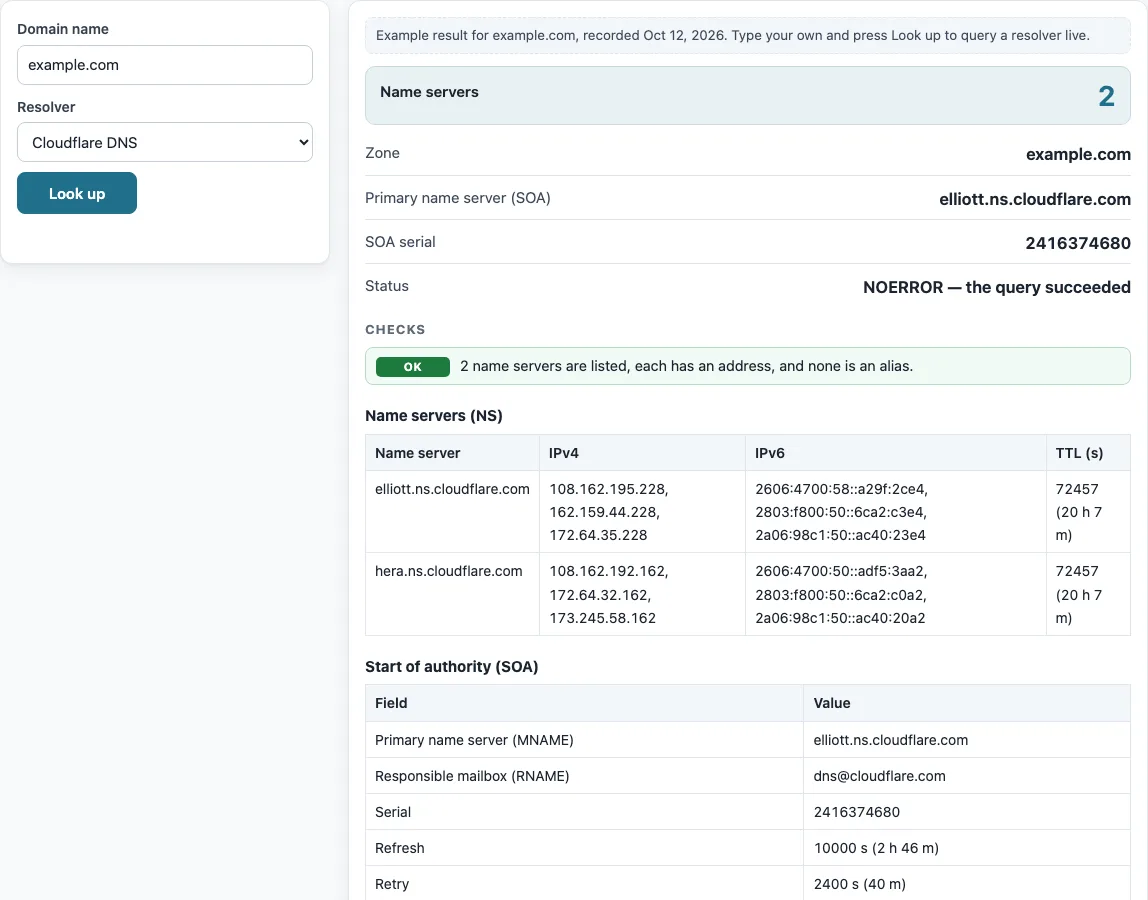
How to use the NS lookup
- Type a domain into the “Domain name” box, for example example.com.
- Open the “Resolver” list and pick the resolver to ask.
- Press “Look up”.
- Read the summary: “Name servers” (the count), “Zone”, “Primary name server (SOA)”, “SOA serial” and “Status”.
- Read the table “Name servers (NS)”, which lists each Name server with its IPv4, IPv6 and TTL (s).
- Read the table “Start of authority (SOA)”, which lists each Field and its Value.
- Read the checks. If the name you typed is not the top of a zone, a note tells you which zone it belongs to and shows that zone’s name servers.
After the result, use “Copy result” to copy the output, or “Copy link” to copy a link to the lookup.
Below the result, “The same query on the command line” lists the matching dig and nslookup commands, so you can repeat the check from a server or compare it with your own network’s resolver. To compare resolvers, run the lookup once with “Cloudflare DNS” and once with “Google Public DNS”: different answers usually mean one of them still holds an older cached copy.
Check the SOA serial after you publish a change.
How to check NS record of a domain
Enter the domain in the tool and press “Look up” to see its NS records in the “Name servers (NS)” table. On a computer with a command line, run nslookup -type=NS example.com or dig +noall +answer example.com NS to get the same records.
What are NS records and what do they do?
NS records name the authoritative servers for a zone. They tell resolvers which servers hold the answers for a domain. Each NS target is a host name, and the tool looks up its IPv4 and IPv6 addresses so you can see where each server is reached.
Why does a domain need at least two name servers?
RFC 1034 §4.1 says “By administrative fiat, we require every zone to be available on at least two servers.” RFC 1912 §2.8 says “You are required to have at least two nameservers for every domain.” The check is OK when there are two or more servers, each with an address, and none is an alias. A single name server gives a warning. The result describes what the check saw at that moment.
Why must name servers have addresses and not be aliases?
RFC 2181 §10.3 says NS targets must be hosts with address records and never aliases. A name server with no address is flagged as a problem. So is a name server that is a CNAME. To check a host name on its own, use the CNAME lookup.
What does the SOA record contain?
The SOA record has seven fields: MNAME, RNAME, SERIAL, REFRESH, RETRY, EXPIRE and MINIMUM (RFC 1035 §3.3.13). MNAME is the primary name server. RNAME is a mailbox, where the first label is the local part and the rest is the domain. So dns.cloudflare.com means dns@cloudflare.com.
What is the SOA serial and how is it formatted?
The SOA serial lets secondary servers detect a new version of the zone. RFC 1912 §2.2 recommends the format YYYYMMDDnn. When the value looks like that, the table adds “(date format: YYYY-MM-DD)”. The example.com serial, 2416374680, does not follow that pattern, so no date is shown.
What do refresh, retry, expire and minimum mean?
Refresh is how often secondaries check for changes. Retry is the wait after a failed check. Expire is how long a secondary keeps serving data without contact. Minimum is the negative-caching TTL (RFC 2308 §4, §5). RFC 1912 §2.2 says expire must be greater than the minimum and retry intervals. In the example.com record, refresh is 10000 s (2 h 46 m), retry 2400 s (40 m), expire 604800 s (7 d) and minimum 1800 s (30 m). Expire is greater than both, so that check passes.
Why can the name servers shown differ from the registrar’s settings?
The NS set the resolver returns comes from the child zone or its cache. The parent delegation at the registry can differ during a change, and this tool does not query the parent directly. Name servers changed at the registrar appear in resolvers only after the cached NS records (TTL) expire. The example.com records were recorded with a TTL of 70355 s.
Sources (checked 13 October 2026): RFC 1034 · RFC 1035 · RFC 1912 · RFC 2181 · RFC 2308
Worked examples
| Input | Result |
|---|---|
| example.com | 2 name servers in zone example.com |
| google.com | 4 name servers in zone google.com |
| mail.example.com | 2 name servers in zone example.com |
Calculated by the tool above; open it with the same values to see each step.
Frequently asked questions
How do I check the NS record of a domain?
Enter the domain in “Domain name”, pick a “Resolver”, and press “Look up”. The “Name servers (NS)” table lists each server with its addresses.
Does this show the name servers set at my registrar?
It shows what the resolver returns from the child zone or its cache. The tool does not query the parent directly, so a recent change may not appear until cached NS records expire.
What does the single name server warning mean?
It means only one name server is listed for the domain. RFC 1034 §4.1 and RFC 1912 §2.8 both call for at least two. Add a second server at your DNS host if you manage the zone.
What does “name server without address” mean?
The name server listed in the NS records has no A or AAAA record, so the tool cannot find its address. RFC 2181 §10.3 requires NS targets to have address records.
Can I look up the name servers for a subdomain?
Yes. Enter the subdomain, such as mail.example.com. The tool finds the zone it belongs to, shows that zone’s name servers, and adds a note that the name is not the top of a zone.
Can this tool do a reverse NS lookup?
No. Finding the domains that use a given name server cannot be done from DNS alone, and this page does not claim it. To go from an IP address to a host name, use the reverse DNS lookup.
What command shows NS records in a terminal?
Run nslookup -type=NS example.com or dig +noall +answer example.com NS, replacing example.com with your domain.
Related tools
- DNS lookup: run a general lookup when you need records other than NS.
- A record lookup: check the IPv4 address that a host name points to, such as a name server’s address.
- MX lookup: check the mail servers for a domain.
- TXT record lookup: read the TXT records that a domain publishes.
- CNAME lookup: check whether a host name is an alias, which name servers must not be.
- Reverse DNS lookup: go from an IP address to its host name.
- DNS propagation checker: compare answers across resolvers after a change.
- DNS record types: learn what each record type, including NS and SOA, is for.