Reverse DNS Lookup (rDNS Check)
Type an IPv4 or IPv6 address to see its PTR host name and whether forward and reverse DNS match.
Recent
Your last 10 settings, saved only in this browser. Nothing is uploaded.
Get notified about new checks and updates
We send a short email only when we add a new tool or make a major change to one — no newsletter, no ads, never shared. To unsubscribe, email support@360jiance.com with the word “unsubscribe” and we delete your address. What we store.
This reverse DNS lookup (rDNS check) finds the host name, stored as a PTR record, that an IPv4 or IPv6 address points to. It then checks whether that host name resolves back to the same address, a check called forward-confirmed reverse DNS (FCrDNS). The tool is free and needs no sign-up. Enter an IP address, pick a resolver, and press “Look up”. Each lookup sends only the IP address to the resolver you chose.
Use it as a DNS reverse search or IP reverse lookup (ipreverse lookup): see which name an IP address publishes, to check the reverse DNS of a server, or to find out why an address has no PTR record. The results show what the check saw at the moment you ran it.
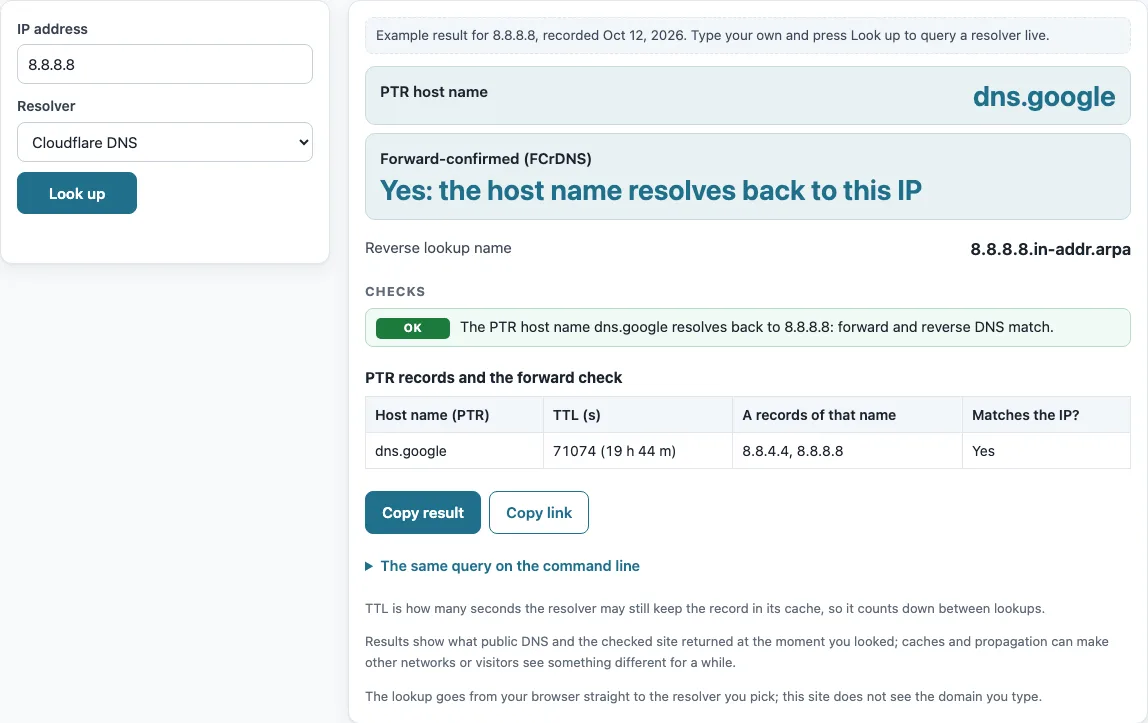
How to use the reverse DNS lookup
- In the “IP address” field, type an IPv4 address such as 8.8.8.8 or an IPv6 address such as 2001:4860:4860::8888. IPv6 can be written in short form, in full, or inside [brackets].
- Open “Resolver” and choose the resolver you want to query.
- Press “Look up”.
- Read “PTR host name” to see the name the address points to.
- Read “Forward-confirmed (FCrDNS)”. It shows “Yes: the host name resolves back to this IP”, “No: …”, “No PTR record to confirm”, or “n of m host names resolve back to this IP”.
- Check “Reverse lookup name” and the table “PTR records and the forward check”. The “Matches the IP?” column shows whether each host name’s A or AAAA records include your address.
- Press “Copy result” to copy the output, or “Copy link” to share the lookup.
If the input is not valid, the tool shows a specific message: an octet over 255, leading zeros, text that is not an address, or an empty field. Before your first lookup, a labelled example for 8.8.8.8 is shown so you can see the layout first.
Below the result, “The same query on the command line” lists the matching dig and nslookup commands, so you can repeat the check from a server or compare it with your own network’s resolver. To compare resolvers, run the lookup once with “Cloudflare DNS” and once with “Google Public DNS”: different answers usually mean one of them still holds an older cached copy.
What does reverse DNS mean?
Reverse DNS (short for reverse domain name system lookup) is the lookup that starts from an IP address and returns a host name. A normal DNS lookup goes the other way, from a name to an address. The answer is held in a PTR record, and the tool reports it as “PTR host name”.
The record is usually set by the owner of the IP block, such as an ISP or cloud provider, often through their control panel. It is not set by the owner of a domain that uses the address. So the result depends on who controls the reverse zone.
How is the reverse DNS name of an IP address built?
Reverse lookups are stored in special zones. IPv4 addresses use in-addr.arpa with the octets reversed, as defined in RFC 1035 §3.5. For example, 10.2.0.52 is looked up as 52.0.2.10.in-addr.arpa.
IPv6 addresses use ip6.arpa. The 32 hex digits are reversed and separated by dots, as defined in RFC 3596 §2.5. The name shown under “Reverse lookup name” is the name built from these rules.
How to check reverse DNS record
Enter the IP address in the tool, press “Look up”, and read “PTR host name” and “Forward-confirmed (FCrDNS)”. Together they show the reverse record and whether it points back to the address. From a terminal, run nslookup 8.8.8.8 or dig -x 8.8.8.8.
How to check PTR record in DNS
A PTR record maps an address to a name. The tool first queries the PTR of the reverse name, then the A record (IPv4) or AAAA record (IPv6) of each host name, up to 8 names. For a short answer from the command line, use dig +noall +answer -x 8.8.8.8.
How to test reverse DNS and PTR record
Testing means running the forward-confirmed check. The tool takes each PTR host name, looks up its A or AAAA records, and returns “Yes” only if the original IP is among them. Problems are flagged when a host name is a CNAME, has no A or AAAA record, does not exist, or does not resolve to the IP. Several PTR records are reported as information.
How to check reverse DNS for mail server
Enter the sending IP address of the mail server. A matching PTR and forward record is the consistent setup that RFC 1912 §2.1 asks for: the PTR must point to a valid A record, not to a CNAME alias. A host with several addresses needs a PTR for every address.
The result shows how the setup looks to this check. It does not show how any mail receiver will handle the mail.
Why do private IP addresses have no reverse DNS?
Private (RFC 1918 §3), loopback (RFC 1122 §3.2.1.3, RFC 4291 §2.5.3), link-local (RFC 3927, RFC 4291 §2.5.6), unique-local IPv6 (RFC 4193), and shared CGNAT (RFC 6598) addresses have no public reverse DNS. For 10.0.0.1, the reverse name 1.0.0.10.in-addr.arpa returns NXDOMAIN, which is expected.
For a public IP, the same answer means no PTR is published, and the tool reports “No PTR record”.
Sources (checked 13 October 2026): RFC 1035 · RFC 1122 · RFC 1912 · RFC 1918 · RFC 3596 · RFC 3927 · RFC 4193 · RFC 4291 · RFC 6598
Worked examples
| Input | Result |
|---|---|
| 8.8.8.8 | dns.google — Yes: the host name resolves back to this IP |
| 2001:4860:4860::8888 | dns.google — Yes: the host name resolves back to this IP |
| 10.0.0.1 | No PTR record — No PTR record to confirm |
| 1.1.1.1 | one.one.one.one — Yes: the host name resolves back to this IP |
Calculated by the tool above; open it with the same values to see each step.
Frequently asked questions
Is reverse DNS lookup free?
Yes. The tool is free and needs no sign-up. Each lookup sends only the IP address to the resolver you choose.
Why does my IP show “No PTR record”?
For a public IP, it means no PTR record is published for that address. The owner of the IP block, usually an ISP or hosting provider, can add one through their control panel.
Can reverse DNS show every domain hosted on an IP?
No. Reverse DNS returns the host name that the IP owner published for that address, not every domain hosted on it.
Does reverse DNS lookup work for IPv6?
Yes. Enter the IPv6 address in short form, in full, or inside [brackets]. The forward check then uses AAAA records.
Does a “Yes” result mean my mail will be delivered?
No. The result describes what the check saw at that moment. It does not promise how any mail server will treat your mail.
Why does a private IP address return no result?
Private, loopback, link-local, unique-local, and shared CGNAT addresses have no public reverse DNS, so NXDOMAIN is expected for them.
How long does a PTR change take to show?
As long as the old PTR record’s TTL, shown in the table, because resolvers keep the old answer until it expires.
Related tools
- DNS lookup: look up common record types for a domain name when you do not start from an IP address.
- A record lookup: check the IPv4 addresses a host name points to, which is the forward step of the reverse check.
- MX lookup: find the mail servers for a domain when you are checking mail setup.
- TXT record lookup: read TXT records, such as those used for mail policies, for a domain.
- CNAME lookup: see whether a host name is an alias, which the reverse check flags as a problem.
- NS lookup: find the name servers for a domain that controls its records.
- DNS propagation checker: see whether a DNS change has reached several resolvers.
- DNS record types: read a plain explanation of PTR, A, AAAA, CNAME, and other record types.