SameSite Cookie Builder (Cookie SameSite)
Set a cookie's attributes to get the Set-Cookie line and a table of when the browser sends it.
Recent
Your last 10 settings, saved only in this browser. Nothing is uploaded.
Get notified about new checks and updates
We send a short email only when we add a new tool or make a major change to one — no newsletter, no ads, never shared. To unsubscribe, email support@360jiance.com with the word “unsubscribe” and we delete your address. What we store.
This SameSite cookie builder is a free Set-Cookie generator that runs entirely in your browser, with no sign-up. You enter a cookie name and value, choose a SameSite setting of Lax, Strict, None or Not set, and it outputs the full Set-Cookie header line. It also shows a SameSite behavior summary, how many of six request types would carry the cookie, and a Problem row when browsers would reject it. Use it to set SameSite correctly before you add the header to your server, or to see why a cookie is being dropped on cross-site requests.
Everything stays in your browser.
How to use the Set-Cookie builder
- Type a Cookie name and a Cookie value. The defaults are session_id and abc123.
- Pick a SameSite value: Lax, Strict, None, or Not set.
- Turn on Secure (HTTPS only). Browsers reject SameSite=None without it.
- Turn on HttpOnly (hidden from JavaScript) if scripts on the page should not read the cookie.
- Open More options only if you need a Name prefix, Path, Domain, or Max-Age (seconds).
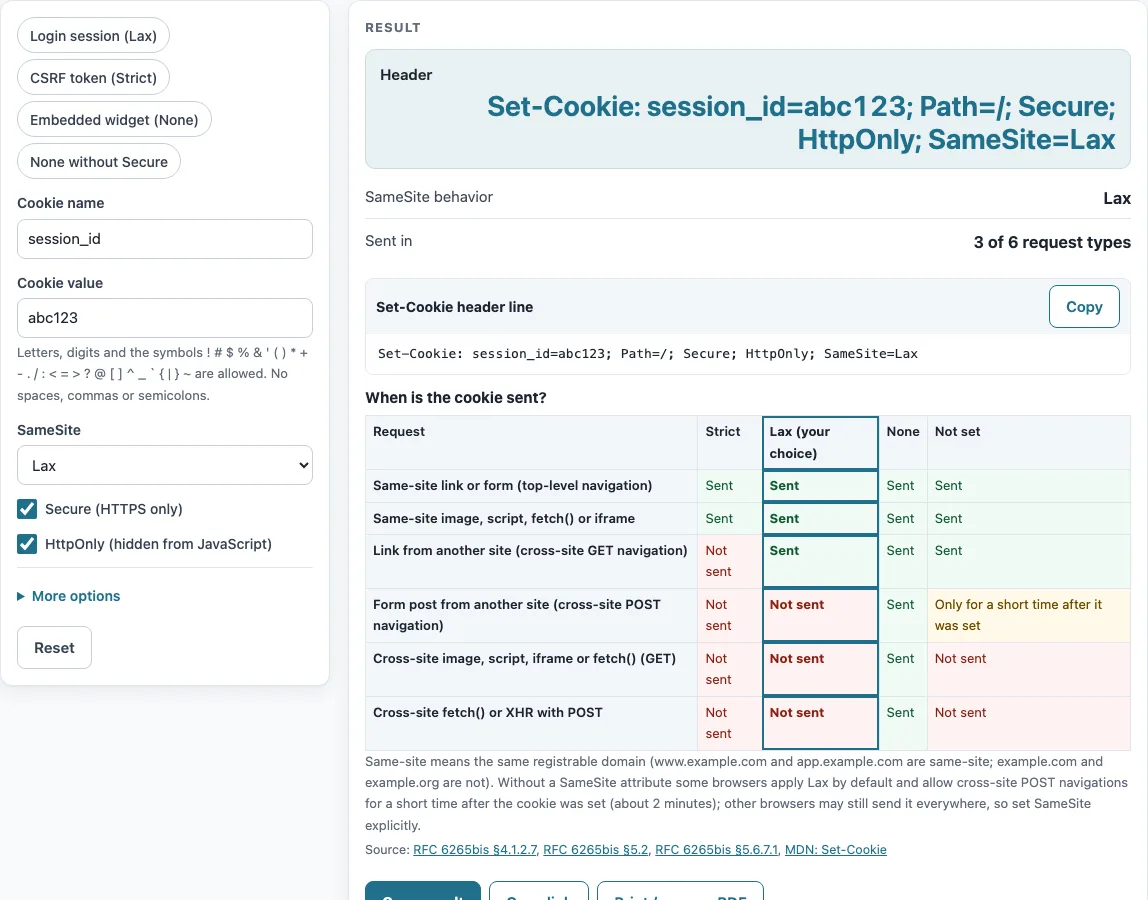
- Copy the line in Header (Set-Cookie: …). Check SameSite behavior, Sent in (n of 6 request types), and the Problem row.
- Look at When is the cookie sent? The highlighted column shows your chosen SameSite value.
The four presets fill in the form for common cases: Login session (Lax), CSRF token (Strict), Embedded widget (None), and None without Secure. The last one is useful for seeing the error. Load a preset first, then change any field you need. With the defaults, the builder outputs Set-Cookie: session_id=abc123; Path=/; Secure; HttpOnly; SameSite=Lax and reports “3 of 6 request types”.
Change one attribute at a time and watch the table: switching SameSite from Lax to Strict, for example, removes the cookie from links that come from other sites.
The Problem row explains any rule the cookie breaks.
SameSite cookie explained: when does the browser send it?
SameSite is a cookie attribute that controls whether a browser sends the cookie on cross-site requests. Two sites are same-site when they share a registrable domain, so www.example.com and app.example.com are same-site, while example.com and example.org are cross-site. The section numbers on this page refer to RFC 6265bis, the IETF draft that updates the cookie standard and describes SameSite (§5.2).
The “When is the cookie sent?” table in the builder shows six kinds of request as rows: a link or form on your own site (a top-level navigation), an image, script, fetch() or iframe request from your own site, a link from another site, a form post from another site, an image, script, iframe or fetch() GET request from another site, and a cross-site fetch() or XHR POST. Each column is one SameSite value, and the column you picked is highlighted, so you can read straight down it to see which requests carry your cookie.
SameSite Lax vs Strict vs None: what is sent where?
Strict sends the cookie only with same-site requests (§4.1.2.7). Lax also sends it on cross-site top-level navigations, such as following a link, but only for safe methods like GET. Fetch(), image and script requests, and iframe navigations are excluded (§5.6.7.1). None sends the cookie with both same-site and cross-site requests (§4.1.2.7), and it requires Secure (§5.7).
In the builder’s matrix, Strict is sent on 2 of 6 request types, Lax on 3 of 6, and None on all 6. Strict can break a login that starts from a link on another site, because the cookie is missing on that first request. Lax keeps those links working, which is why it suits most session cookies. Embedded third-party widgets need None with Secure.
What is the default SameSite when none is set?
A cookie with no SameSite attribute gets the “Default” enforcement. For most requests this behaves like Lax. The Lax-allowing-unsafe variant also allows cross-site POST top-level navigations (§5.6.7.2). MDN notes that some browsers use Lax as the default and still allow a cross-site POST for about two minutes after the cookie is set. The builder reports Not set as 3 of 6, plus that short POST window. Unrecognised SameSite values also get the default enforcement (§4.1.2.7), so set the value explicitly.
Sources (checked 13 October 2026): IETF Datatracker · MDN
Worked examples
| Input | Result |
|---|---|
| SameSite Lax, Secure Yes | 3 of 6 request types |
| SameSite Strict, Secure Yes | 2 of 6 request types |
| SameSite None, Secure Yes | 6 of 6 request types |
| SameSite None, Secure No | Browsers reject SameSite=None without Secure, so this cookie is never stored. |
| SameSite No attribute (browser default), Secure Yes | 3 of 6 request types |
Calculated by the tool above; open it with the same values to see each step.
Frequently asked questions
Why is my SameSite=None cookie rejected?
Browsers reject SameSite=None unless the cookie also has Secure, so the cookie is never stored. Turn on Secure (HTTPS only) in the builder, or add Secure to the header. The Problem row flags this case.
How do I set SameSite in a header?
Add SameSite=Lax, SameSite=Strict, or SameSite=None to the Set-Cookie line, after the other attributes. The builder writes attributes in this order: Max-Age, Domain, Path, Secure, HttpOnly, SameSite. Copy the Header line exactly as it appears.
Which SameSite value should a login session cookie use?
Lax, in most cases: the cookie still comes with a visitor who follows a link to your site, but not with forms or requests other sites send in the background. Use Strict for cookies that guard sensitive actions, such as a CSRF token, and None with Secure only for cookies a widget needs inside other sites.
Does HttpOnly change when a cookie is sent?
No. HttpOnly only hides the cookie from document.cookie in JavaScript (§4.1.2.6). SameSite alone decides whether the browser sends it on a given request.
What rules apply to __Host- and __Secure- cookie names?
A __Secure- name requires Secure. A __Host- name requires Secure, Path=/, and no Domain (§4.1.3). For example, __Host-id=v; Max-Age=3600; Path=/; Secure; SameSite=None passes the builder’s checks when HttpOnly is off.
Related tools
- Cookie checker: use it to inspect cookies a site already sets.
- Security headers checker: use it to read the headers a live site returns.
- HSTS checker: use it to check whether a site sends a Strict-Transport-Security header.
- CSP generator: use it to build a Content-Security-Policy header.
- SSL checker: use it to check a site’s HTTPS certificate.