Security Headers Checker (HTTP Headers Checker)
Enter a web address, or paste response headers, to check each security header with a reason and a fix.
How this check works: our server sends one ordinary GET request per redirect step (at most 10) to the public address you enter, the same request a browser would make, and shows you a short summary — status codes, selected response headers and, for robots.txt, the file itself (up to 64 KB). It never sends data on your behalf, never contacts private or internal addresses, and does not log or store what you type; results are cached for 10 minutes and each visitor can run 10 checks per minute.
Recent
Your last 10 settings, saved only in this browser. Nothing is uploaded.
Get notified about new checks and updates
We send a short email only when we add a new tool or make a major change to one — no newsletter, no ads, never shared. To unsubscribe, email support@360jiance.com with the word “unsubscribe” and we delete your address. What we store.
How to use the security headers checker
- Type the full address of your site, such as
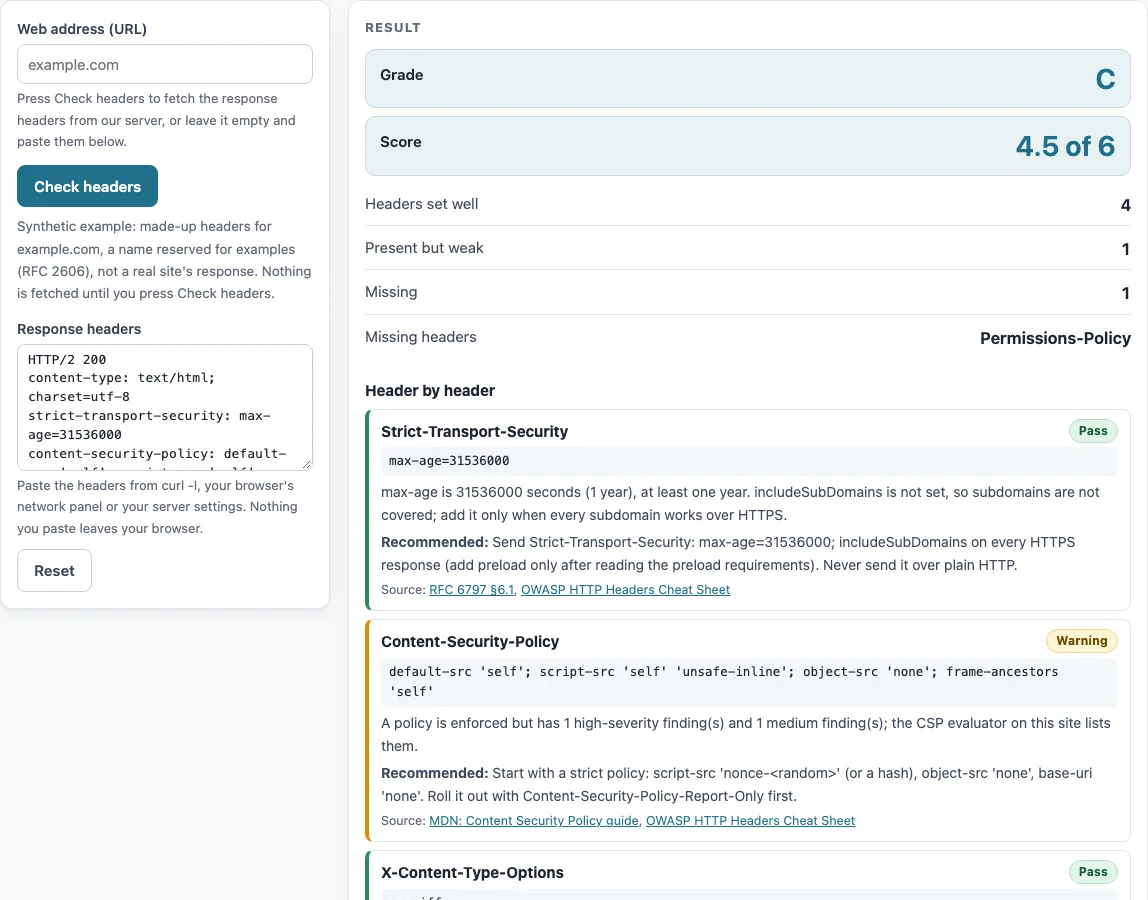
https://example.com, into Web address (URL). - Press Check headers. Wait for the result to replace the example.
- Read the summary at the top: Grade (A-F), Score, then Headers set well, Present but weak, Missing and Missing headers with the header names.
- Scroll to Header by header. Each card shows the header name, a Pass, Warning or Missing badge, the value found, the reason, the Recommended: value and Source: links.
- Check Also checked (not part of the grade) for Cross-Origin-Opener-Policy, Cross-Origin-Embedder-Policy, Cross-Origin-Resource-Policy, Server, X-Powered-By and X-XSS-Protection. The last one appears only if it is present.
- To check headers you already have, paste them into Response headers instead of using a web address. For example, run
curl -I https://your-site.examplein a terminal and paste the output. The paste box is analyzed in your browser.
Press Copy result to copy the report, Copy link to share it, or Print to save it as a PDF. If a long value such as a Content-Security-Policy is cut off, the page shows a warning, because the live check truncates values at 2048 characters. Paste the full headers in that case.
Run the check again after each change to your server.
How do I check the security headers of my website?
Use the Check headers route for a live read, or paste a copy of your response headers for an offline read. The live read shows the headers of the final response after redirects, up to 10 hops, so check the address that real visitors reach.
Which security headers should every site send?
The six scored headers are Strict-Transport-Security, Content-Security-Policy, X-Content-Type-Options, frame-ancestors or X-Frame-Options, Referrer-Policy and Permissions-Policy. Strict-Transport-Security passes with max-age of at least 31536000 seconds, and includeSubDomains is optional, though the page notes when it is missing (RFC 6797 §6.1). Browsers ignore this header over plain HTTP, so send it only over HTTPS (RFC 6797 §8.1). X-Content-Type-Options passes only with nosniff, the only value defined. Framing passes with an enforced frame-ancestors that is not *, or with X-Frame-Options set to DENY or SAMEORIGIN.
What does the grade mean?
The grade is this page’s own scheme, not a standard. Each scored header gives 1 point when set well, 0.5 when present but weak, and 0 when missing. A total of 6 is A, 5 to 5.5 is B, 4 to 4.5 is C, 3 to 3.5 is D, and anything below 3 is F. A score of “4.5 of 6” therefore gives grade C.
Why does my site show “Missing” for Permissions-Policy?
The header is absent from the response. Permissions-Policy replaced Feature-Policy, so a site that sends only Feature-Policy gets a Warning instead. The header is optional but recommended for switching off browser features your site does not use, such as geolocation=(), camera=(), microphone=().
Do I need Server / X-Powered-By?
No. A Server value that includes a version number, such as nginx/1.24.0, gets a Warning, and any X-Powered-By header gets a Warning. OWASP advises removing X-Powered-By and giving Server a non-informative value. Neither header is part of the score.
Why can the check differ from my browser?
The check fetches the address without cookies or login, so a page that depends on being signed in can return different headers from your browser. Redirects are followed up to 10 hops, and only the headers of the final hop are shown. A browser may also reach the site through a different path or cached response.
Sources (checked 13 October 2026): RFC 6797 · hstspreload.org · OWASP Cheat Sheets · WHATWG Fetch · W3C
Worked examples
| Input | Result |
|---|---|
| 5 header line(s) pasted | Grade A (6 of 6 points) |
| 2 header line(s) pasted | Grade F (0 of 6 points) |
| 3 header line(s) pasted | Grade F (2.5 of 6 points) |
| 6 header line(s) pasted | Grade C (4.5 of 6 points) |
Calculated by the tool above; open it with the same values to see each step.
Frequently asked questions
Does pasting headers send them to your server?
No. Pasted headers are analyzed in your browser and never sent anywhere. Only the Check headers button contacts our server.
What do Pass, Warning and Missing mean?
Pass means the header meets the rule for that header. Warning means it is present but weak, for example a Content-Security-Policy with 'unsafe-inline' in script-src, a report-only policy, or Feature-Policy alone. Missing means the header was not found in the response.
Why does HSTS say “not applicable”?
The final URL of the fetch used plain http://. Browsers ignore Strict-Transport-Security sent over insecure transport, so the header does not apply to that response.
Is the example on the page my site’s result?
No. The example shows made-up headers for example.com, the reserved example domain, and is labelled as synthetic. Nothing is fetched until you press Check headers.
Can I check headers of a page that needs a login?
Not with the live check, because it fetches the address without cookies. Copy the response headers from your browser’s network panel while signed in and paste them into “Response headers”; they are checked in your browser.
Does a grade of A mean my site is secure?
No. The grade only says how the six headers are set. It says nothing about the code, the server or the data behind the page.
Related tools
- SSL checker: use it to see whether a site’s certificate is valid and when it expires.
- SSL certificate decoder: use it to read the fields of a certificate you paste in, all inside your browser.
- CSR decoder: use it to read a certificate signing request before you send it to a certificate authority.
- CAA record lookup: use it to see which certificate authorities a domain allows to issue certificates.
- HSTS checker: use it when you want to focus only on the Strict-Transport-Security header.
- Domain expiration checker: use it to see when a domain’s registration is due to expire.
- DNSSEC checker: use it to check whether a domain’s DNS responses are signed with DNSSEC.