SPF Record Checker
Type a domain to validate its SPF record, count its DNS lookups and test a sending IP address.
Recent
Your last 10 settings, saved only in this browser. Nothing is uploaded.
Get notified about new checks and updates
We send a short email only when we add a new tool or make a major change to one — no newsletter, no ads, never shared. To unsubscribe, email support@360jiance.com with the word “unsubscribe” and we delete your address. What we store.
This SPF record checker looks up the SPF record of a domain and reports whether it is found, whether it is valid, and whether it stays within the limits that mail receivers apply. Type a domain, press Look up, and the page shows a verdict, the DNS lookup count, void lookups, and the policy for servers that are not listed.
You can also test one sending server. Enter its IP address and the page shows whether that address gets pass, fail, softfail, neutral, none, permerror or temperror. This online SPF checker runs in the browser, is free, and needs no sign-up. The only network traffic is the DNS-over-HTTPS queries to the resolver you choose, and each lookup sends only the domain or IP address you typed. Results describe what the check saw at that moment.
How to use the SPF record checker
- Type the domain in Domain, for example
example.com. A pasted URL or address is reduced to its host name. The domain must have at least two labels. - Optional: type an IPv4 or IPv6 address, such as the sending server’s address, in IP address to test (optional).
- Press Look up.
- Read the verdict box. It says SPF record found and valid, found with warnings, has errors, or No SPF record for the domain.
- Check the key facts: DNS lookups (“7 of 10 allowed”), Void lookups (“0 of 2 allowed”) and Servers not listed ("~all (softfail)", “-all (fail)”, or the neutral default).
- Go through the Checks list. Each line is tagged OK, Note, Warning or Error.
- Open the Include tree to see which included or redirected record adds each lookup.
- If you entered an IP address, read the Test IP result.
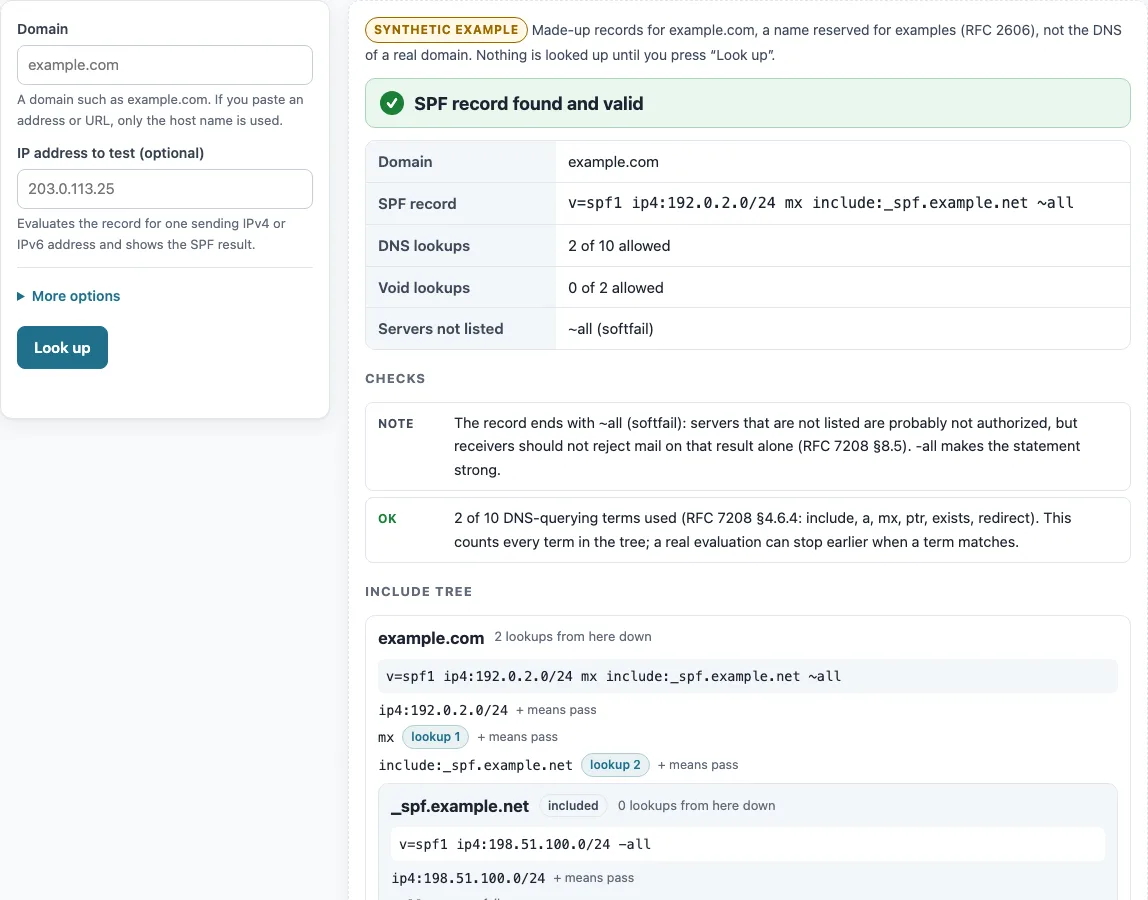
Before the first lookup, the panel shows a dashed “Synthetic example” result for example.com. Nothing is sent on page load.
To change the resolver, open More options and pick Cloudflare DNS or Google Public DNS under DNS resolver. If the chosen one fails, the other is tried. Use Copy result to copy the output, or Copy link to share a link that restores the form and runs the lookup again. To test another address against the same records, change only IP address to test (optional) and press Look up. No new DNS queries are sent.
How to check if an SPF record is correct?
A correct SPF record has exactly one TXT record that starts with v=spf1, valid syntax, no more than 10 DNS-querying terms, and at most 2 void lookups. It should end with -all or ~all (RFC 7208 §4.5, §4.6, §4.6.4, §4.7). The Checks list tests each of these points.
A record with neither all nor redirect ends with the default result neutral, as if it said ?all. A softfail (~all) is a weak statement, and receivers SHOULD NOT reject on it alone (§8.5). A TXT string holds at most 255 octets, so longer records are split into several strings that are joined without spaces (§3.3). Keep the DNS answer under 512 octets (§3.4). The tool warns when the record text alone is longer than 512 characters.
How to test an SPF record for one sender?
Type the sending server’s IP address in IP address to test (optional) and press Look up. The result is one of pass, fail, softfail, neutral, none, permerror or temperror, and the Test IP result names the term that matched. The test follows the evaluation order in RFC 7208 §4.6.2.
The qualifiers are + (pass, the default when none is written), - (fail), ~ (softfail) and ? (neutral). Terms after all are never tested (§5.1). Macros and ptr cannot be evaluated, so they count as no match and the tool adds a note. IPv4-mapped IPv6 addresses are converted to IPv4 (§5).
The synthetic example.org record ends in +all, so it gets a warning. With the test IP 203.0.113.5, the result is pass, because the address matched +all.
Why does my SPF record fail with too many DNS lookups?
Each include, a, mx, ptr, exists and redirect term counts toward the limit, including terms inside records that you include. More than 10 gives a permerror (RFC 7208 §4.6.4). The terms ip4, ip6, all and exp do not count. The tool counts every such term in the whole tree, while a real check may stop earlier on a match, so its number can be higher than what a receiver reaches for one message.
To lower the count, replace include terms with ip4 or ip6 ranges where you know them, or remove services you no longer use. The synthetic example.net record has eleven include: terms followed by -all. The tool reports 11 of 10 lookups, and the test IP gets a permerror.
Does a subdomain use the SPF record of the main domain?
No. A receiver looks up SPF on the exact domain of the sender (RFC 7208 §4.4). Mail sent from news.example.com is checked against the record of news.example.com, not of example.com. A subdomain that sends mail needs its own SPF record. The tool queries exactly the name you type, so enter the subdomain to check it.
How to find an SPF record and read an example?
Enter the domain and press Look up. The tool reads the TXT record that starts with v=spf1 and shows it in the SPF record row. You can also look up the TXT record of the domain with any DNS tool.
The synthetic example.com before the first lookup uses this record: v=spf1 ip4:192.0.2.0/24 mx include:_spf.example.net ~all. Each part does something different. v=spf1 marks the record. ip4:192.0.2.0/24 allows one IPv4 range. mx allows the domain’s mail servers. include:_spf.example.net adds the result of another record. ~all gives softfail to every other sender. The mx and include terms make 2 of 10 lookups, and ip4 does not count. This example is made up under a reserved name and is not the DNS of a real domain.
Sources (checked 13 October 2026): RFC 7208
Worked examples
| Input | Result |
|---|---|
| example.com | SPF record found and valid; 2 of 10 lookups |
| example.org, 203.0.113.5 | SPF record has errors; 4 of 10 lookups; test IP: pass |
| example.net, 203.0.113.9 | SPF record has errors; 11 of 10 lookups; test IP: permerror |
Calculated by the tool above; open it with the same values to see each step.
Frequently asked questions
How do I check my SPF record?
Enter the domain in Domain and press Look up. The tool reads the TXT record that starts with v=spf1 and reports its syntax, lookups and policy. You can also look up the TXT record of the domain with any DNS tool.
Can I have two SPF records?
No. Two TXT records that start with v=spf1 give a permerror, so a domain must have exactly one. Merge them into one record (RFC 7208 §4.5).
How do I verify or validate an SPF record?
Look for the verdict “SPF record found and valid” and check that the Checks list has no Error or Warning lines. A valid result means the record passes the syntax and limit checks at that moment. It does not promise that mail will be delivered.
What does “Servers not listed” mean?
It shows the result for senders that match none of the terms. “-all (fail)” rejects them, “~all (softfail)” marks them as suspicious, and “no “all” mechanism, so the default result is neutral” means the record gives no firm answer.
Does the tool send my domain anywhere else?
No. The only network traffic is the DNS-over-HTTPS queries to the resolver you choose, Cloudflare DNS or Google Public DNS. Everything else runs in your browser.
Why does the page show an example before I type anything?
The dashed “Synthetic example” result for example.com is built in, so you can see the layout. Nothing is sent to DNS until you press Look up.
Related tools
- DMARC checker: use it to check the DMARC policy that works alongside SPF for the same domain.
- DKIM checker: use it when you also need to check the DKIM record of a domain.
- MX lookup: use it to see the mail servers that the
mxterm refers to. - TXT record lookup: use it to read any TXT record, including the raw SPF text.
- Reverse DNS lookup: use it to check the PTR name of a sending IP address.
- DNS propagation checker: use it after you change a record to see how resolvers answer.
- DNS lookup: use it for any other record type of a domain.