SSL Certificate Decoder
Paste a PEM certificate or chain to read every field, decoded in your browser.
Recent
Your last 10 settings, saved only in this browser. Nothing is uploaded.
Get notified about new checks and updates
We send a short email only when we add a new tool or make a major change to one — no newsletter, no ads, never shared. To unsubscribe, email support@360jiance.com with the word “unsubscribe” and we delete your address. What we store.
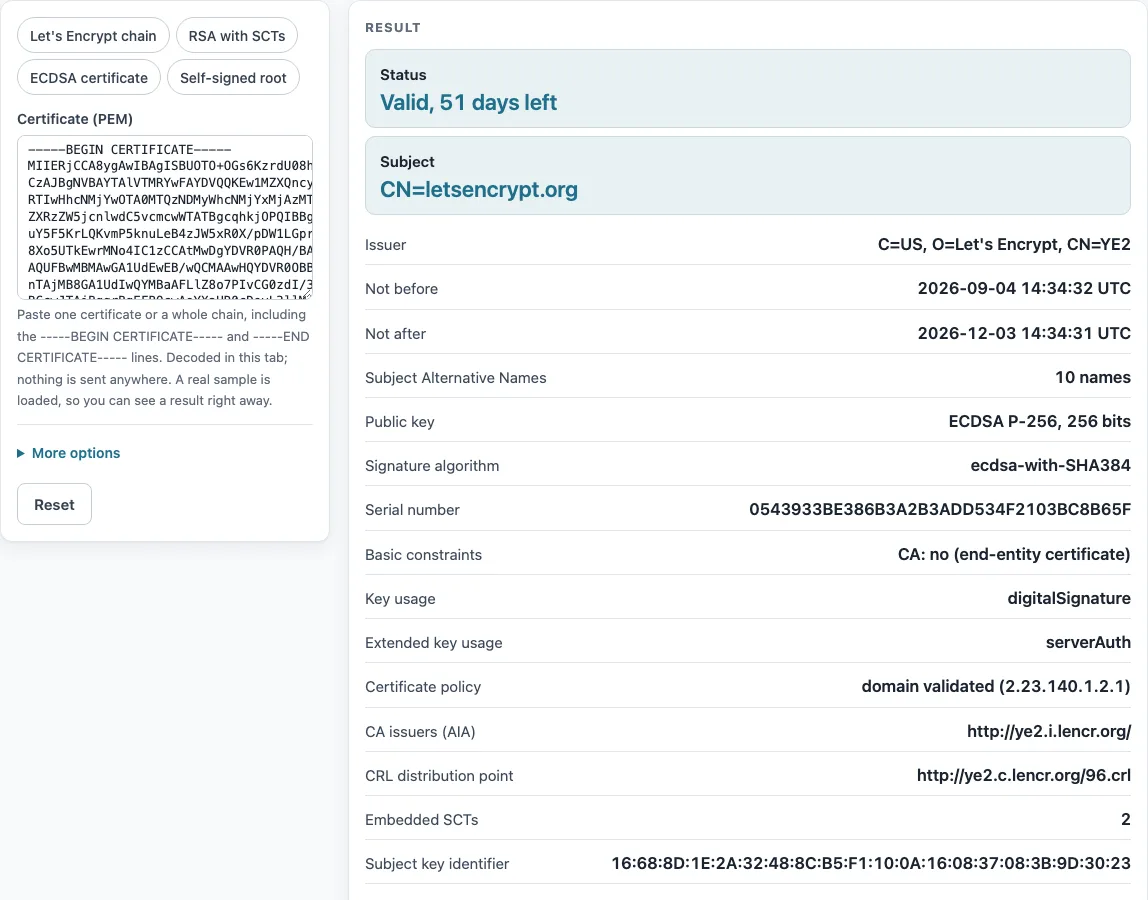
This SSL certificate decoder reads an SSL/TLS certificate in PEM format and shows what it contains: whether it is valid and how many days are left, who it was issued to and by whom, its validity dates, its public key and signature details, and its SHA-256 and SHA-1 fingerprints. Paste one certificate, or a whole chain, and the fields appear at once.
Use it as an online certificate decoder for any X.509 certificate in PEM form, from a single website certificate to a root CA. It is free, with no sign-up. A Let’s Encrypt certificate is loaded by default, so you can see a full result before you paste your own.
How to use the SSL certificate decoder
- Click into the “Certificate (PEM)” box and paste one or more blocks that start with
-----BEGIN CERTIFICATE-----and end with-----END CERTIFICATE-----. Bare base64 also works, and any text around the blocks is ignored. - Read the Status row first. It shows valid with the days left, or expired. Subject is right below it.
- Scroll down for Issuer, Not before, Not after, Subject Alternative Names, Public key, Signature algorithm, and the fingerprints. Rows the certificate does not have are left out.
- If you pasted a chain, check the Pasted chain table. Its “Role” and “Issuer = next subject” columns show how the certificates link together.
- To look at another certificate in the chain, open “More options” and set “Certificate number to show” to 2, 3, and so on. The number 1 is the first certificate you pasted.
- To load an example, click one of the presets: “Let’s Encrypt chain”, “RSA with SCTs”, “ECDSA certificate”, or “Self-signed root”.
Use “Copy result” to copy the decoded output, or “Print / save as PDF” to keep a copy. “Copy link” puts your pasted PEM into the link, so anyone who opens it sees the same certificate. Very long chains may be too long to share this way.
How do I decode an SSL certificate?
You decode a certificate by reversing the PEM wrapping and then reading the fields inside the X.509 structure. Paste the text between the BEGIN CERTIFICATE and END CERTIFICATE lines, and the tool handles the rest.
A PEM file is base64 text of DER data between the BEGIN and END lines (RFC 7468 §2-3). The base64 is decoded to DER bytes (ITU-T X.690). Those bytes follow the X.509 Certificate structure in RFC 5280 §4.1: version, serial number, signature algorithm, issuer, validity, subject, public key, and extensions.
Validity is a pair of dates, “Not before” and “Not after”. Dates through 2049 are written as UTCTime, and later dates as GeneralizedTime (RFC 5280 §4.1.2.5). Extensions carry the detail. Subject Alternative Name lists the host names (RFC 5280 §4.2.1.6). Basic constraints says whether the key may sign other certificates (§4.2.1.9). The extended key usage value serverAuth (1.3.6.1.5.5.7.3.1) marks a TLS server certificate (§4.2.1.12).
Key size comes from the key itself. For RSA it is the bit length of the modulus. For ECDSA it is the curve size, so P-256 gives 256, P-384 gives 384, and P-521 gives 521. The SCT count is the number of entries in the SignedCertificateTimestampList extension (RFC 6962 §3.3).
To get the same fields from a file on your own computer, run openssl x509 -in cert.pem -noout -text.
What is a SHA-256 fingerprint?
A SHA-256 fingerprint is a hash of the whole certificate, computed over its DER bytes. It is written as hex pairs separated by colons. For ISRG Root X1, for example, it starts with 96:BC:EC:06 and ends with 08:C6.
The fingerprint is not a field inside the certificate. It is calculated from the file as a whole, so changing even one byte produces a different fingerprint. That is why people use it to identify one exact certificate. The SHA-1 fingerprint is calculated the same way with a different hash function. The offline equivalent is openssl x509 -noout -fingerprint -sha256.
Sources (checked 13 October 2026): RFC 5280 · RFC 6962 · RFC 7468 · CA/Browser Forum
Worked examples
| Input | Result |
|---|---|
| Certificate 1 of 2 pasted | letsencrypt.org, issued by YE2, valid 2026-09-04 to 2026-12-03, EC P-256, ecdsa-with-SHA384 |
| Certificate 1 of 2 pasted | www.python.org, issued by GlobalSign Atlas R3 DV TLS CA 2025 Q4, valid 2026-01-13 to 2027-02-14, RSA 2048, sha256WithRSAEncryption |
| Certificate 1 of 1 pasted | github.com, issued by Sectigo Public Server Authentication CA DV E36, valid 2026-09-01 to 2026-11-29, EC P-256, ecdsa-with-SHA256 |
| Certificate 1 of 1 pasted | ISRG Root X1, issued by ISRG Root X1, valid 2015-06-04 to 2035-06-04, RSA 4096, sha256WithRSAEncryption |
| Certificate 3 of 4 pasted | Root YE, issued by ISRG Root X2, valid 2026-05-13 to 2032-09-02, EC P-384, ecdsa-with-SHA384 |
Calculated by the tool above; open it with the same values to see each step.
Frequently asked questions
Is it safe to paste my certificate online?
A certificate is public data, because a server sends it to every visitor. This tool decodes it in your browser tab and does not upload it. Never paste a private key. The tool refuses private keys and explains why.
How do I read the days left?
Days left is “Not after” minus the current time, rounded down to whole days, in UTC. A Let’s Encrypt certificate decoded on 2026-10-13 showed “Valid, 51 days left”. The warning under 30 days is this tool’s own reminder threshold, not a standard.
How do I get the certificate of a website?
Run openssl s_client -connect example.com:443 -servername example.com -showcerts </dev/null in a terminal, or export the certificate from your browser’s certificate viewer. The SSL checker on this site lists certificates logged for a domain, but it cannot download the one a server presents.
What does the chain order check mean?
It checks that each certificate’s issuer name matches the subject name of the next certificate, byte for byte. A mismatch means the chain is in the wrong order or includes the wrong intermediate. The check does not verify signatures, build a path to a trust store, check revocation, or connect to any server.
Why are some rows missing from the output?
The tool shows only the fields the certificate actually contains. OCSP, CRL, key usage, and similar rows are left out when they are absent. A missing “Embedded SCTs” row is not an error, because some certificates have none.
Does a “Valid” status mean my site is trusted?
No. Status compares the validity dates with the current time and shows what the check saw at that moment. It does not check whether a browser trusts the issuer or whether the certificate has been revoked.
Related tools
- SSL checker: use it to see the certificates logged for a domain.
- CSR decoder: use it when you have a certificate signing request rather than a certificate.
- CAA record lookup: use it to check which certificate authorities a domain allows to issue certificates.
- Security headers checker: use it to check the HTTP headers a site sends.
- Domain expiration checker: use it to see when a domain registration expires.