SSL Checker
Type a host name to check its HTTPS setup and the certificates logged for it, with days left.
How this check works: our server sends one ordinary GET request per redirect step (at most 10) to the public address you enter, the same request a browser would make, and shows you a short summary — status codes, selected response headers and, for robots.txt, the file itself (up to 64 KB). It never sends data on your behalf, never contacts private or internal addresses, and does not log or store what you type; results are cached for 10 minutes and each visitor can run 10 checks per minute.
Recent
Your last 10 settings, saved only in this browser. Nothing is uploaded.
Get notified about new checks and updates
We send a short email only when we add a new tool or make a major change to one — no newsletter, no ads, never shared. To unsubscribe, email support@360jiance.com with the word “unsubscribe” and we delete your address. What we store.
This SSL checker looks up a domain and reports three things: whether HTTPS works, what the HSTS header and plain-HTTP redirect look like, and which certificates are currently valid in the public Certificate Transparency logs. It is a free SSL validator and cert checker that needs no sign-up. The page sends no request until you press “Check SSL”.
The server part runs on this site’s read-only check service. Your browser fetches the certificate list from crt.sh. The checker does not read the certificate itself, so it cannot show the exact certificate your server presents. The steps further down this page explain how to find that certificate.
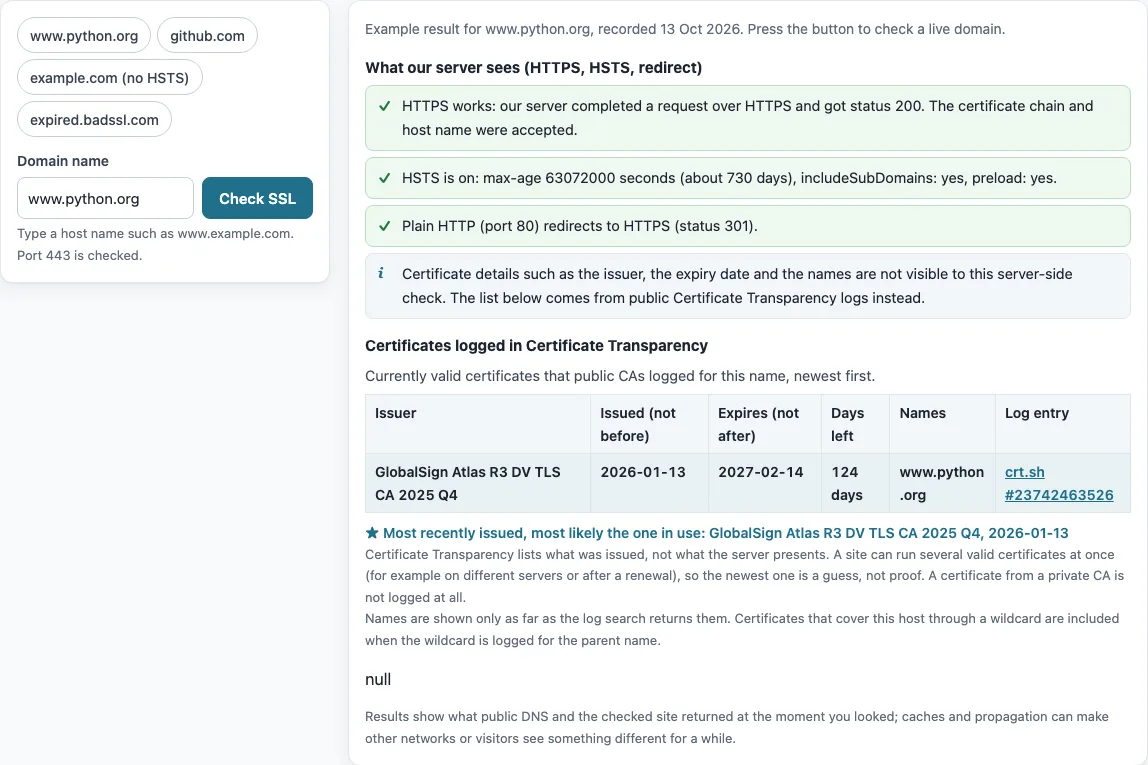
How to use the SSL checker
- Click the “Domain name” field and type a domain, for example www.python.org.
- Press “Check SSL”. The button shows “Checking…” while the check runs.
- Read “What our server sees (HTTPS, HSTS, redirect)”. Each row is colored: green is ok, amber is a warning, red is a problem, and gray is information. The rows show whether HTTPS works (with its status), the HSTS header or “none”, and whether plain HTTP (port 80) redirects to HTTPS (status 301), does not answer, or answers 200 instead of redirecting.
- Read the fixed note in that section. It says certificate details are not visible to this check.
- Scroll to “Certificates logged in Certificate Transparency”. Check the Issuer, Issued (not before), Expires (not after), Days left, Names and Log entry columns.
- Find the row marked “Most recently issued, most likely the one in use” and read its caveat before you rely on it.
- Press “Copy link” to copy a link with
?d=<host>&run=1. Opening that link runs the check again.
Opening a link with only ?d=<host> fills in the field but does not run the check. The page opens with a recorded example for www.python.org, dated 13 Oct 2026. The chips github.com, example.com (no HSTS) and expired.badssl.com load other recorded examples, including a failed HTTPS result.
How do I check an SSL certificate’s expiration?
Look at the “Expires (not after)” and “Days left” columns in the “Certificates logged in Certificate Transparency” table. The row marked “Most recently issued, most likely the one in use” shows when the newest logged certificate stops being valid. That row is a guess about which certificate the server uses, so confirm it with the certificate itself. Decode the certificate with the SSL certificate decoder on this site, which works entirely in your browser, or open the certificate from the padlock in your browser.
Renewal timing matters more now. Publicly trusted TLS certificates issued on or after 2026-03-15 have a maximum validity of 200 days (CA/Browser Forum Baseline Requirements v2.3.1 §6.3.2). The Let’s Encrypt certificate recorded for letsencrypt.org is valid from 2026-09-04 to 2026-12-03, which is 90 days. The 14-day warning on this page is this site’s own threshold, not a standard.
Why can’t the checker show my server’s certificate details?
The server part of the check runs on Cloudflare Workers, which do not expose the server certificate, its issuer, dates, names, chain or TLS version. The answer therefore never includes certificate details. Instead, the page lists the certificates that public certificate authorities have logged in Certificate Transparency.
To see the certificate your server presents, run openssl s_client -connect host:443 -servername host in a terminal, replacing host with your domain. Then decode the output with the SSL certificate decoder on this site.
Is my SSL certificate valid?
“HTTPS works” means a request completed, so the checker accepted the certificate chain and the host name. “HTTPS failed” means the request did not complete, but the page does not say why. The check needs a valid chain, an unexpired certificate and a matching host name, so one of those is the likely cause. Failures show up as “connect failed”.
A passing result does not test every client, protocol or setting. It only shows what the check saw at that moment. A site behind a CDN may also serve different certificates in different places. If the page warns that HTTPS failed from the server even though the logs hold a valid certificate, the server may be presenting a different certificate from the one that was logged.
Why does the checker show several valid certificates?
Certificates are often renewed before the old one expires, so two or more can cover the same names at the same time. The table lists every logged certificate that is still within its validity period, so overlapping renewals appear side by side. The tool merges precertificate and certificate rows that share a serial number and issuer, then sorts the list by issue date.
The “most likely in use” label is only a guess. Certificate Transparency shows what was issued, not what a server presents. On 2026-10-13, the newest logged certificate for github.com was a *.github.com certificate issued 2026-10-08. The certificate that openssl s_client showed for the server had the common name github.com and was issued 2026-09-01.
Wildcard names follow RFC 6125 §6.4.3. A * stands for exactly one leftmost label, so *.example.com covers www.example.com but not example.com or a.b.example.com. The tool applies this rule when it decides which logged certificates cover the host.
Does a missing HSTS header mean my SSL is broken?
No. HSTS is an extra protection, and a site without it still works over HTTPS. The HTTP Strict Transport Security header tells browsers to use HTTPS only for the number of seconds in max-age, and optionally for subdomains (RFC 6797 §6.1). A browser ignores an HSTS header received over plain HTTP (RFC 6797 §8.1), so the header only has an effect when the site sends it over HTTPS.
The recorded example for example.com shows the difference. HTTPS works, there is no HSTS header, and plain HTTP answers 200 without redirecting. Use the HSTS checker to look at the header alone.
Sources (checked 13 October 2026): RFC 6125 · RFC 6797 · CA/Browser Forum
Worked examples
| Input | Result |
|---|---|
| www.python.org | HTTPS works; HSTS on; 1 valid certificate in the CT logs |
| github.com | HTTPS works; HSTS on; 8 valid certificates in the CT logs |
| example.com | HTTPS works; no HSTS; CT logs not shown |
| expired.badssl.com | HTTPS fails; CT logs not shown |
Calculated by the tool above; open it with the same values to see each step.
Frequently asked questions
Why does the redirect check matter?
The redirect check shows whether plain HTTP on port 80 sends visitors to HTTPS. Visitors who type the bare domain reach port 80 first, so a redirect to https:// is what moves them to the secure site. Without one, they can stay on the unencrypted version.
The check reports one of three results: a redirect with a status such as 301, no answer on port 80, or a 200 response instead of a redirect. This part of the check is separate from the certificate. The recorded example for expired.badssl.com shows HTTPS failing with “connect failed” while plain HTTP still redirects to HTTPS.
Why does the checker say the rate limit was reached?
The check allows 10 checks per minute for each visitor, so wait a minute before you run another. Results are cached on the server for 10 minutes, so a repeat check of the same domain can return the same result.
What does the warning about all valid certificates expiring within 14 days mean?
Every certificate in the CT table that is still valid expires within 14 days, so renewal is due soon. The 14-day threshold is this site’s own choice, not a standard.
Why does the Certificate Transparency part show a timeout or crt.sh error?
crt.sh is a free public search service and is sometimes slow or returns errors. The browser stops waiting after 20 seconds. The HTTPS part of the check does not depend on crt.sh, so it still runs.
Why does the page say no currently valid certificate was found in the logs?
No logged certificate for the domain is valid today. Private-CA and internal certificates are not in Certificate Transparency, so they never appear there. If certificates are logged but none are valid now, the page shows a separate warning.
What do the DNS errors “name does not exist” and “no A/AAAA record” mean?
These errors come from the check service. “Name does not exist” means the domain could not be found. “No A/AAAA record” means the name has no IPv4 or IPv6 address to connect to. Check the spelling of the domain and its DNS records, then run the check again.
Can I check an IP address or an internal server name?
No. The check accepts only public DNS names. It does not accept IP addresses, private names or internal names, and it uses only ports 80 and 443.
What data is sent when I run a check?
For the server part, only the domain is sent to this site’s read-only check service, which logs nothing. For the Certificate Transparency part, your browser sends the domain to crt.sh. The SSL certificate decoder and the other decoders work entirely in your browser, so nothing is sent.
Related tools
- SSL certificate decoder: use it to read the fields of a certificate, such as its issuer, dates and names.
- CSR decoder: use it to read a certificate signing request before you send it to a certificate authority.
- CAA record lookup: use it to see which certificate authorities a domain allows to issue certificates.
- HSTS checker: use it when you only need to look at the Strict-Transport-Security header.
- Security headers checker: use it to review response headers beyond HSTS.
- Domain expiration checker: use it to check when a domain name registration expires, which is separate from certificate expiry.
- DNSSEC checker: use it to check whether a domain’s DNS records are signed with DNSSEC.