TXT Record Lookup
Type a domain to see its TXT records, with SPF, DMARC and verification records labelled.
Recent
Your last 10 settings, saved only in this browser. Nothing is uploaded.
Get notified about new checks and updates
We send a short email only when we add a new tool or make a major change to one — no newsletter, no ads, never shared. To unsubscribe, email support@360jiance.com with the word “unsubscribe” and we delete your address. What we store.
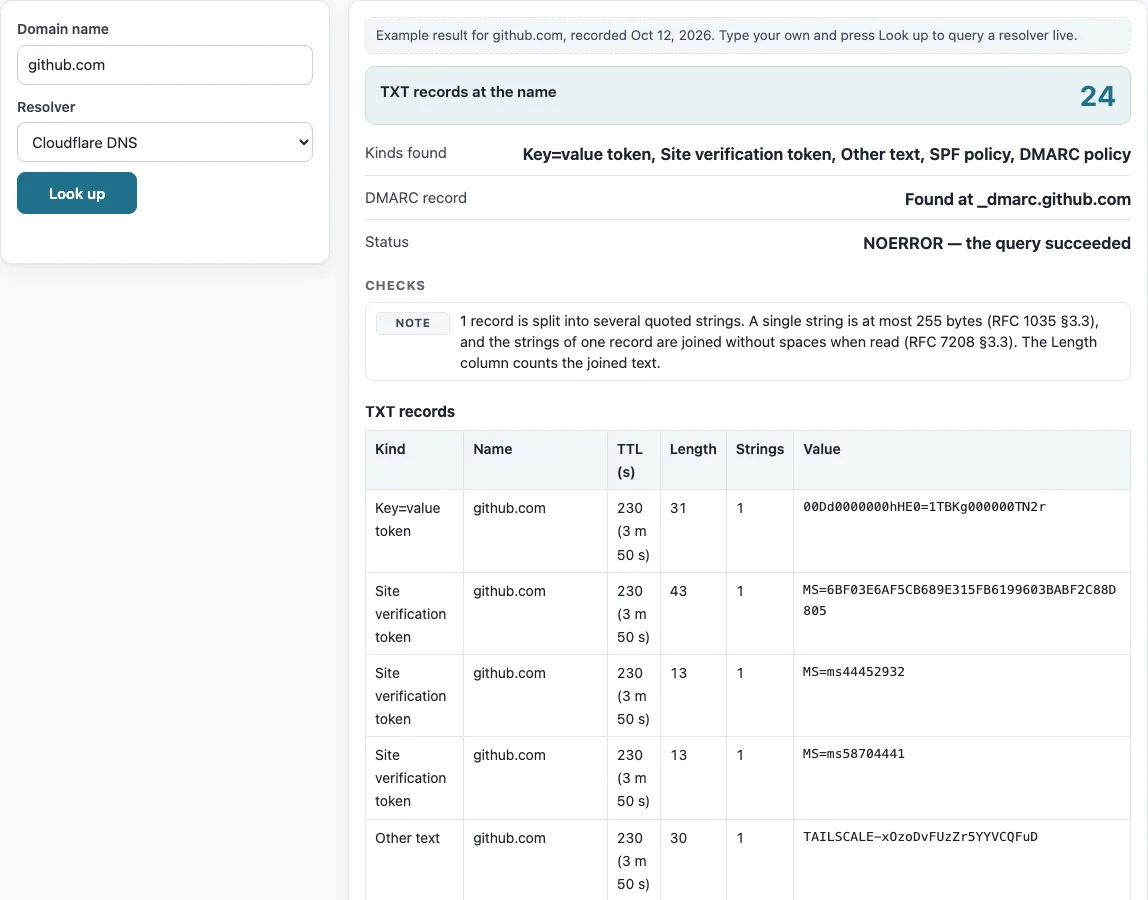
How to use the TXT record lookup
- Type a domain in the “Domain name” box, such as example.com.
- Open the “Resolver” list and pick the resolver you want to query.
- Press “Look up”.
- Read the summary: “TXT records at the name”, “Kinds found”, “DMARC record” and “Status”.
- Scroll to the table “TXT records” and check the Kind, Name, TTL (s), Length, Strings and Value columns.
To query one exact name only, type the full name, such as _dmarc.example.com. The tool then looks up that name and nothing else. Use “Copy result” to copy the output, or “Copy link” to share this lookup.
Below the result, “The same query on the command line” lists the matching dig and nslookup commands, so you can repeat the check from a server or compare it with your own network’s resolver. To compare resolvers, run the lookup once with “Cloudflare DNS” and once with “Google Public DNS”: different answers usually mean one of them still holds an older cached copy.
Records longer than 255 characters show more than one string in the Strings column, joined in the Value column.
The DMARC and BIMI rows show what was found at those names, or that nothing was published there.
How to check a DNS TXT record
To check a DNS TXT record, enter the domain, pick a resolver and press Look up. The table “TXT records” lists each record with its Kind, Name, TTL (s), Length, Strings and Value.
A TXT record (TXT RR, a text resource record) is a DNS record type that holds text. Each TXT record is made of one or more character-strings of up to 255 bytes, and strings of one record are joined without spaces (RFC 1035 §3.3, §3.3.14; RFC 7208 §3.3). Browsers and other clients see the value after the strings are joined. The Length column counts characters of the joined text, and the Strings column shows how many quoted pieces the record was published in.
The Kind column depends on how the text starts. Text beginning v=spf1 is labelled SPF policy, and text beginning v=DMARC1 is labelled DMARC policy. A DKIM public key is labelled when it begins v=DKIM1 or sits at a name containing ._domainkey.. The tool cannot guess DKIM selectors, so type the exact name to see one. Text that matches none of the known shapes is labelled Other text.
How to get a TXT record for a domain
To get a TXT record for a domain, look up the domain name itself, then look up the names where specific TXT records are published. DMARC records sit at _dmarc.<domain> and BIMI records at default._bimi.<domain>. This tool queries all three in one run when you enter a domain. Site owners create TXT records in their DNS provider’s control panel, and this tool only reads them.
Some rules decide how a set of TXT records is read:
- Only records beginning exactly with
v=spf1count as SPF. A name must not have more than one SPF record, and two make SPF fail with a permanent error (RFC 7208 §3.2, §4.5). - If a name has several DMARC records, DMARC processing does not apply (RFC 7489 §6.1, §6.6.3). The tool reports this as a problem.
- BIMI is not an RFC. The tool recognizes only the
v=BIMI1tag. - SPF uses TXT records only. The old SPF record type (99) is obsolete.
You can run the same query from a command line:
dig +noall +answer example.com TXT
Sources (checked 13 October 2026): RFC 1035 · RFC 7208 · RFC 7489
Worked examples
| Input | Result |
|---|---|
| github.com | 24 TXT records; kinds: Key=value token, Site verification token, Other text, SPF policy, DMARC policy |
| example.com | 2 TXT records; kinds: SPF policy, Other text, DMARC policy |
| _dmarc.google.com | 1 TXT record; kinds: DMARC policy |
Calculated by the tool above; open it with the same values to see each step.
Frequently asked questions
How do I find my TXT record?
Enter your domain in “Domain name” and press Look up. Your TXT records appear in the table “TXT records”, and the “Kinds found” summary shows which types are present.
How do I check a DNS TXT record from the command line?
Run nslookup -type=TXT example.com or dig +noall +answer example.com TXT, replacing example.com with your domain. The output lists the same records that the tool shows, though the tool also adds the Kind labels and checks.
Why does one TXT record show several strings?
A single string can hold at most 255 bytes, so longer values are split into several quoted strings. The Strings column shows how many pieces there are, and the Value column shows the joined text.
Does this tool check whether my SPF or DMARC setup works?
No. The tool shows and labels the records, but it does not evaluate SPF or DMARC. Its checks flag things such as more than one SPF record or more than one DMARC record.
Why is my DKIM record not shown?
DKIM keys sit at <selector>._domainkey.<domain>, and the tool cannot guess selectors. Type the full name, such as selector1._domainkey.example.com, to query it directly.
Can I check the TXT records of a subdomain?
Yes. Enter the subdomain name in “Domain name” and the tool queries that exact name for TXT records.
Related tools
- DNS lookup for querying any common record type for a domain, when you need more than TXT records.
- A record lookup for finding the IPv4 addresses a name points to.
- MX lookup for checking the mail servers a domain publishes.
- CNAME lookup for finding the alias target of a name.
- NS lookup for checking which nameservers are authoritative for a domain.
- Reverse DNS lookup for finding the name that belongs to an IP address.
- DNS propagation checker for seeing whether a record change has reached several resolvers.
- DNS record types for a plain explanation of what each record type is for.