WHOIS Domain Lookup
Type a domain to see its registrar, dates, status and nameservers from the registry's RDAP data.
Recent
Your last 10 settings, saved only in this browser. Nothing is uploaded.
Get notified about new checks and updates
We send a short email only when we add a new tool or make a major change to one — no newsletter, no ads, never shared. To unsubscribe, email support@360jiance.com with the word “unsubscribe” and we delete your address. What we store.
This WHOIS domain lookup (a domain information lookup or domain name info search) shows the registration record for a domain name, including the registrar, expiry date, status codes, name servers, DNSSEC details and any registrant data the registry publishes. It queries RDAP, the modern replacement for the WHOIS protocol, so the result arrives as structured data rather than plain text. It runs in your browser, with no sign-up.
Live lookups send only the domain name to rdap.org, which redirects the request to the registry’s RDAP server. It also works as a domain name provider lookup, because the registrar row names the company that manages the domain. The page is useful for a domain check before you contact a site owner or register a similar name, or to find out when a domain expires. Each result describes what the registry showed at the moment you ran the check.
How to use the WHOIS lookup
- Click the “Domain name” field and type a registered domain, such as example.com.
- Press “Look up”. The button shows “Checking…” while the lookup runs.
- Read the result. Start with “Registrar”, “Expires”, “Status codes” and “Registrant”. A row appears only when the record has a value for it.
- Check the banner above the result. It tells you whether the result is a live check or the labelled example for example.com.
- Open “Raw RDAP JSON” for the full response, or follow “Open the RDAP record” to view the registry’s own record.
- Press “Copy result”, “Copy link” or “Print / save as PDF” to keep or share the result.
The chips “example.com”, “google.com” and “example.nl” each run a live lookup straight away. If you type www.example.com or another subdomain, the page checks the registered domain instead. It tries the name, then its parents down to two labels, using at most three requests. “Copy link” produces a share link that opens the page and runs a live check.
This works as a domain search WHOIS lookup for any domain whose registry runs RDAP: search WHOIS domain records by typing the name, and the page finds the right registry server for you, so you do not need to know where a WHOIS domain name search should go. For repeated domain look-ups, “Copy link” saves a link that runs the same check.
Is WHOIS the same as RDAP?
RDAP replaces WHOIS, so both protocols answer the same kind of question, but RDAP uses a different format. WHOIS returned plain text, while RDAP, developed by the IETF, returns structured JSON over HTTPS. Its queries are defined in RFC 9082, and the domain object (name, status, events, entities, name servers and secureDNS) is defined in RFC 9083 §5.3.
All gTLD registries and registrars must provide RDAP services under the gTLD RDAP Profile. As of 28 January 2025 they are no longer required to provide WHOIS, except for .com, .name and .post. A browser also cannot use port 43 WHOIS, so this tool queries RDAP. IANA’s RDAP bootstrap registry (RFC 9224) lists which server answers for each TLD, and rdap.org uses that list to redirect requests.
How do I look up who owns a domain?
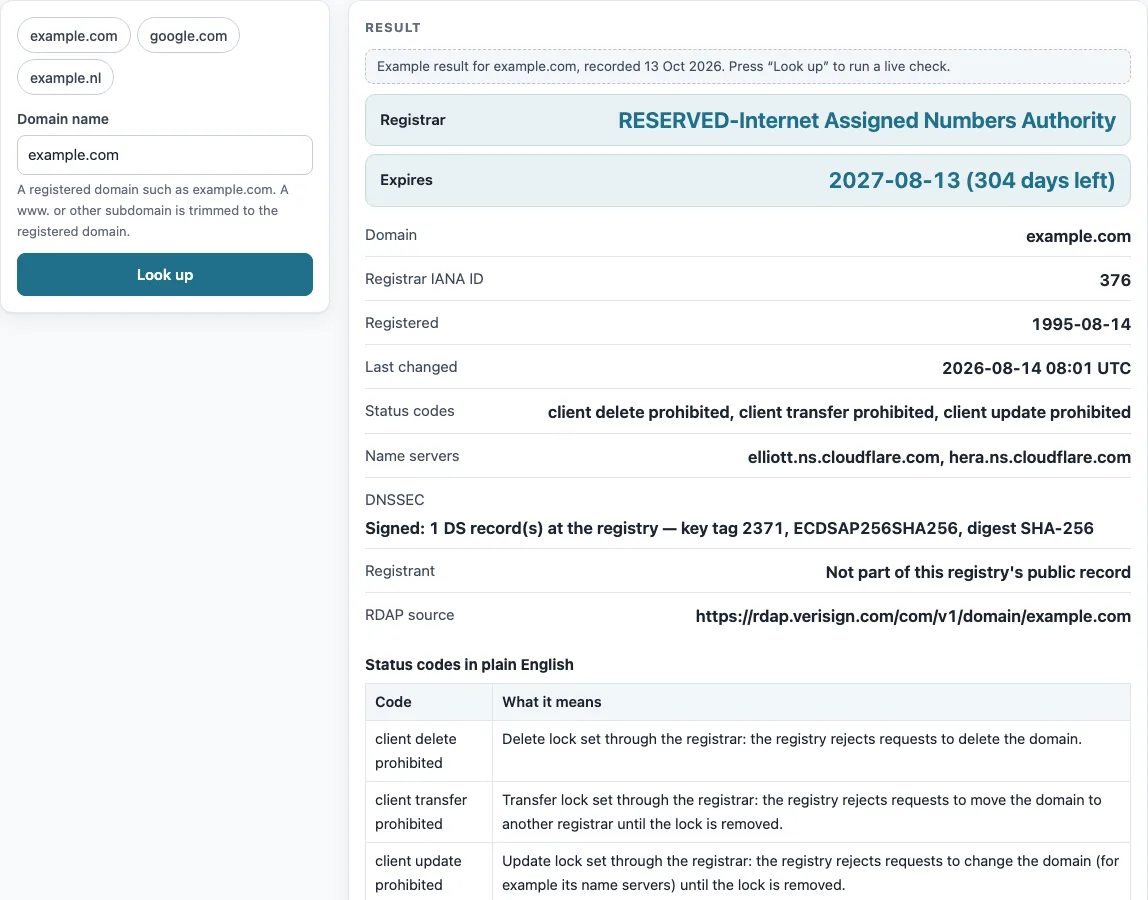
Enter the domain and read the “Registrant” row. Whether you want a domain owner finder, a way to get the domain owner or locate the domain owner, or to check web domain ownership, this is the public record the registry offers. It has four possible states: public, showing the name, organization, e-mail and country; redacted; empty; or absent, when the record contains no registrant entity. The example.com record shows “Not part of this registry’s public record” because Verisign is a thin registry and holds no contact data.
Where the registrant is hidden, the “Registrar” and “Registrar abuse contact” rows still identify the company that manages the domain. The abuse contact shows an e-mail and phone number, and that is the published route for reaching the registrar.
Why is the registrant hidden?
Personal data in public registration records is often redacted. ICANN’s Registration Data Policy, effective 21 August 2025, requires registrars and registries to redact listed personal data, such as the registrant’s name, street and phone, where redaction applies (§9.1.5 and §9.2). It allows the registrant organization to be redacted too, but the registrant country must be published.
RFC 9537 defines a redacted array that tells clients which fields were withheld. Redacted does not mean unreachable. The registrar record carries an abuse contact with the role “abuse”, and the RDAP notices point to the ICANN RDDS inaccuracy complaint form.
What does “client transfer prohibited” mean?
It is an EPP status code, written as an RDAP string, that places a lock on the domain. The lock is set through the registrar, and the registry rejects transfer requests until it is removed. The example.com record lists three client locks: “client delete prohibited, client transfer prohibited, client update prohibited”.
Codes starting with “client” are set through the registrar, and the “server” versions are set by the registry. The “Status codes in plain English” table explains each code, and the “ICANN: EPP status codes” link gives the full list. Hold codes, such as clientHold, mean the domain is not active in DNS and does not resolve. A redemptionPeriod means the registrar asked for deletion; it lasts 30 days under ICANN ERRP §3.1, after which the domain moves to pendingDelete.
Why does a lookup show no registrant or no RDAP service?
Some registries hold no contact data. Verisign is a thin registry for .com and .net, so the example.com result has a registrar entity (IANA ID 376) but no registrant. Many country-code registries have no RDAP service at all. On 13 October 2026, .io, .de, .cn, .ru, .it and .co.jp answered “No RDAP service is available for this resource”. The page reports this instead of failing silently.
Sources (checked 13 October 2026): RFC 9082 · RFC 9083 · RFC 9224 · RFC 9537 · ICANN · ICANN (2) · IANA
Worked examples
| Input | Result |
|---|---|
| example.com | Registrar RESERVED-Internet Assigned Numbers Authority; expires 2027-08-13 (304 days left); DNSSEC: Signed: 1 DS record(s) at the registry — key tag 2371, ECDSAP256SHA256, digest SHA-256 |
| google.com | Registrar MarkMonitor Inc.; expires 2028-09-14 (702 days left); DNSSEC: Not signed (no DS record at the registry) |
| example.nl | Registrar Stichting Internet Domeinregistratie Nederland; expires Not published by this registry; DNSSEC: Signed: 1 DS record(s) at the registry — key tag 21532, ECDSAP256SHA256, digest SHA-256 |
| bbc.co.uk | Registrar British Broadcasting Corporation; expires 2034-12-13 (2983 days left); DNSSEC: Not signed (no DS record at the registry) |
Calculated by the tool above; open it with the same values to see each step.
Frequently asked questions
How do I check domain ownership history?
RDAP shows only the current record. Its events list dated actions, such as registration, last changed, transfer and expiration, but it does not list earlier owners. “Registered” shows the date of the current registration, and “Last changed” shows when the record was last updated, not who held the domain before.
Ownership history needs archived snapshots of the domain from a third-party source, because the registry does not keep a list of previous owners in RDAP.
Does this WHOIS domain lookup send my domain to anyone?
Yes, but only the domain name. A live lookup sends it to rdap.org, which redirects the request to the registry’s RDAP server. Nothing else is sent to a third party by the lookup.
Can I enter www.example.com?
Yes. The page trims www. and other subdomains to the registered domain, so the check runs against example.com.
Why does example.nl show no expiry date?
Some registries, including .nl and .au, publish no expiry date in RDAP. The “Expires” row then reads “Not published by this registry”.
What does “less than a day left” mean?
The expiry date is less than 24 hours away. Days left are whole days between now and the expiration event, rounded down. After the date passes, the page shows “expired N days ago”.
What does “Expires within 30 days” mean?
It is a highlight that this tool adds when a domain expires within 30 days. It is not a rule set by the registry.
How do I verify domain ownership via a DNS record?
The service you are verifying with will give you a TXT record (sometimes a CNAME) to add at your DNS host. After you add it, use the DNS propagation checker with type TXT and enter the token as “Expected value”. The token may be part of a longer TXT record, so a partial match is expected.
Why do I see a rate limit message?
The registry or rdap.org has received too many requests from you in a short time, and the page reports a 429 response. Wait a little and try the lookup again.
Related tools
- Domain expiration checker: use it when you only need to track how many days remain before a domain expires.
- NS lookup: use it to see which name servers a domain currently publishes.
- DNSSEC checker: use it to check whether DNSSEC validates, since the DNSSEC row only shows what the registry holds.
- DNS propagation checker: use it to see whether a new or changed DNS record is visible across resolvers.
- SSL checker: use it to inspect the certificate served by a website.
- DNS lookup: use it to query general DNS records for a domain.
- CAA record lookup: use it to see which certificate authorities a domain allows to issue certificates.